Web app · Pets
Mouse Hunt: Keep your cat entertained with chasing mice on screen
Watch lively mice move across your screen while your cat tries to catch them, with adjustable speed, mouse count, and session timing.
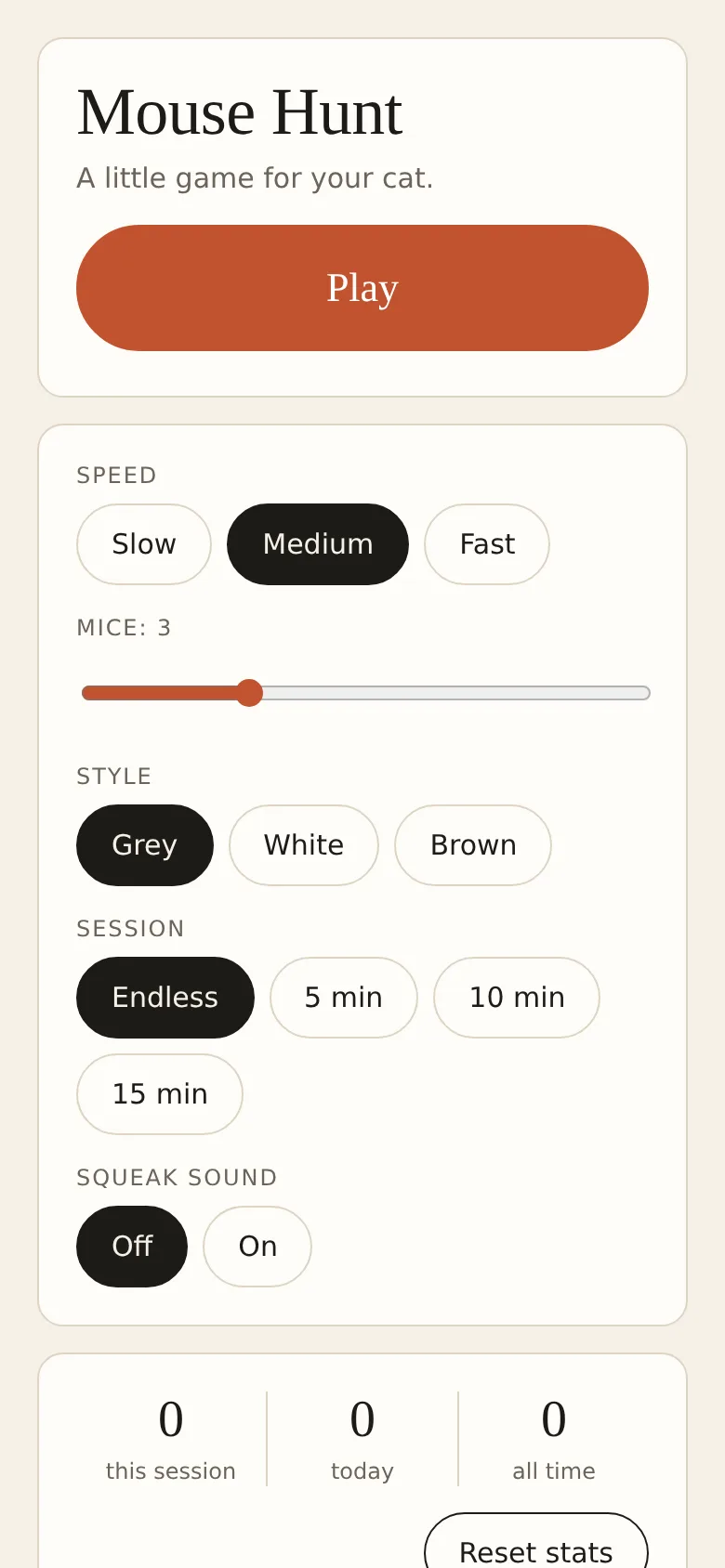
Cats need mental and physical stimulation, but not all play is equal. Mouse Hunt gives your cat an engaging screen-based activity: mice appear from the edges and move across your display in realistic patterns—scurrying slowly, pausing to sniff, then darting away. Your cat will instinctively chase and tap the screen, getting exercise and entertainment while you track how many mice are caught in each session.
What it does
The app displays mice that emerge from the edges of your screen and move in natural patterns. Each mouse scurries, pauses, or darts depending on its state, and bounces off screen edges realistically. When your cat taps a mouse, it triggers a catch animation with optional sound feedback and haptic vibration. The game tracks catches during a session, today, and all time. You choose the speed (slow, medium, fast), number of mice (1 to 8), visual style (grey, white, or brown), session length (endless or 5 to 15 minutes), and whether to enable squeaking sound.
Key features
- Natural mouse behavior Mice scurry, pause, and dart in realistic patterns rather than following predictable paths.
- Customizable difficulty Adjust speed, number of simultaneous mice, session duration, and visual style to suit your cat's interests.
- Catch tracking See catches for the current session, today, and all time to monitor your cat's activity.
- Sound and vibration feedback Enable optional squeaking sound and haptic vibration when a mouse is caught.
- Session timer Run endless games or set a limit of 5, 10, or 15 minutes; mice leave the screen at the end.
- Settings lock Hold the exit button to return to settings after play, preventing accidental exits mid-game.
How to use it
- Tap Play to start a game with your current settings.
- Adjust speed, mouse count, style, session length, and sound in the settings before playing.
- Watch your cat tap or paw at the mice on screen; each catch registers and plays feedback.
- Hold the X button to exit and return to settings or end the session early.
- Check your catch stats to see your cat's performance this session, today, and historically.
Who it’s for
Cat owners who want to provide screen-based mental and physical enrichment for their pets. Works on tablets, phones, and desktop browsers.
The app’s share card (1200×630)
Questions and answers
How do I start a game?
Tap the Play button. Mice will begin scurrying on your screen immediately.
Does the app save my cat's stats?
Yes. The app tracks catches in the current session, today, and all time using your browser's storage. You can reset all stats from the settings screen if storage is available.
Can I play on my phone or tablet?
Yes. Mouse Hunt works on any device with a web browser that supports pointer and touch input, including phones, tablets, and computers.
What do the different settings do?
Speed controls how fast mice move; Mice sets how many appear at once; Style changes their color; Session sets a timer (or endless); Sound enables optional squeaking on catch.
Remix family
Remixes of this app
- Mouse Hunt · Edgar Durand Díaz
More pets apps
- Fox Knight: Sky Isles · A 2D platformer where you leap across floating islands as a brave fox knight, stomp slimes, collect gems and face a boss across three levels.
- Arena Fist 3D · Juego de pelea 3D con luchadores detallados. Juega en modo historia, 1 vs 1, 2 jugadores o entrena contra un muñeco.
- Arena Fist 3D · Juego de pelea 3D con modo historia, entrenamiento, 1-2 jugadores y modo Jefes con 150 niveles progresivos.
- Pesca Tranquila · Juego de pesca sin apuros donde lanzás, recogés peces, completás tu álbum de especies y mejorás tu equipo.
- Mouse Hunt · A game with realistic 3D mice that have distinct personalities, designed for your cat to chase and catch on screen.
- Meow Translator · Tap to decode your cat's meows into theatrical translations, then blast them with a dramatic soundboard. Fun for cat lovers and parties.