Web app · Art & design
Palette Forge: Generate and lock color schemes
Create harmonious 5-color palettes in three different schemes, lock the colors you like, and remix the rest.
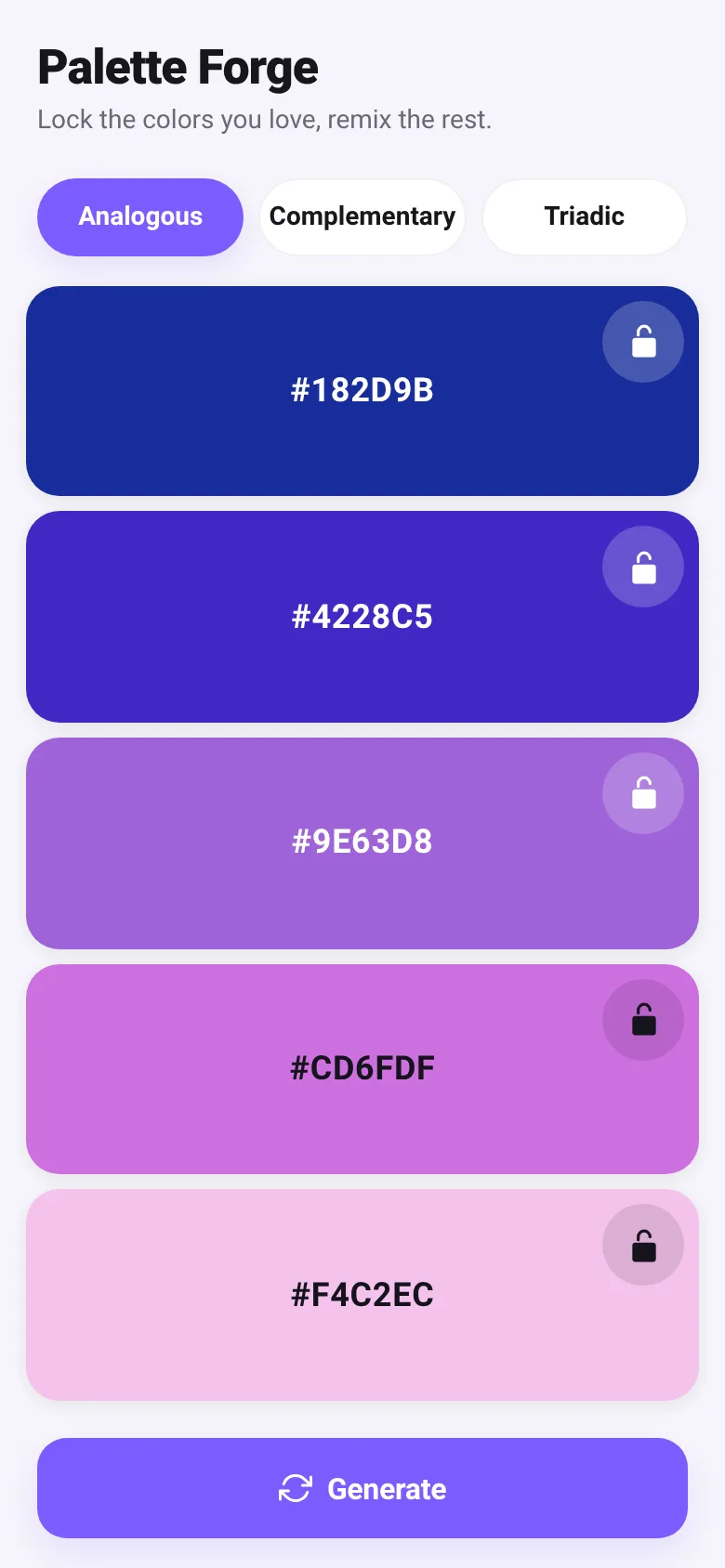
Designers and artists need colors that work together. Palette Forge generates complete color schemes using proven color harmony rules. You choose a scheme—analogous, complementary, or triadic—and the app creates five colors that complement each other. Lock any colors you love, tap regenerate to remix only the unlocked ones, and tap any swatch to copy its hex code to your clipboard.
What it does
The app displays five color swatches arranged horizontally. Each swatch shows its hex code and has a lock button. At the top, three tabs let you switch between analogous (colors near each other on the color wheel), complementary (opposite colors), and triadic (three colors equally spaced) schemes. Tap the Generate button at the bottom to create a new palette; locked colors stay put while others change. Tap any swatch to copy its hex code, with feedback shown in a toast message.
Key features
- Three harmony schemes Choose analogous, complementary, or triadic color relationships to match your design needs.
- Lock and remix Lock colors you like, then regenerate only the unlocked ones to keep your favorites in place.
- One-tap hex copy Tap any swatch to copy its hex code to your clipboard; a toast confirms the copy.
- Persistent palettes Your current scheme and locked colors are saved automatically in your browser.
- Smart contrast Text color adjusts automatically based on background brightness for readability.
How to use it
- Choose your color harmony scheme using the tabs at the top: Analogous, Complementary, or Triadic.
- Tap the Generate button to create a new palette.
- Lock any colors you want to keep by clicking the lock icon on that swatch.
- Tap Generate again to remix only the unlocked colors.
- Tap any swatch to copy its hex code to your clipboard.
Who it’s for
Graphic designers, web designers, artists, and anyone choosing colors for a project who wants instant, harmonious palettes.
The app’s share card (1200×630)
Questions and answers
How do I start with a new palette?
When you open Palette Forge, it generates a random palette in Analogous mode. Tap Generate anytime to create a new one.
Does it save my work?
Yes. Your current scheme and which colors are locked are saved in your browser automatically.
Can I use this on my phone?
Yes, Palette Forge works on any device with a web browser and full-screen support.
How do I copy a color?
Tap any color swatch to copy its hex code. A message will confirm the copy. On older browsers, select and copy manually.
More art & design apps
- Packing List · Builds a categorized packing checklist tailored to your trip length, weather, and activities. Check items off as you pack.
- Day Counter · Track the days until or since events you care about. See countdowns and past milestones in a clean, swipeable card list.
- Decision Wheel · Add your options, spin the wheel, and let it pick the winner. Settle choices with a satisfying spin and confetti celebration.
- Metronome · Keep time with tap tempo, a BPM slider, multiple time signatures, and accented first beats. Essential for musicians and practice sessions.
- Kitchen Converter · Convert cups, tablespoons, teaspoons, grams, ounces and millilitres with ingredient-specific weights for accurate baking and cooking.
- Tip Calculator · Quickly calculate tips with preset percentages or custom amounts, split the bill among people, and round up if you want.