Web app · Productivity
Sort tasks by urgency and importance, then focus on what matters today
Use the Eisenhower Matrix to categorize your work, then view only your urgent and important tasks for the day.
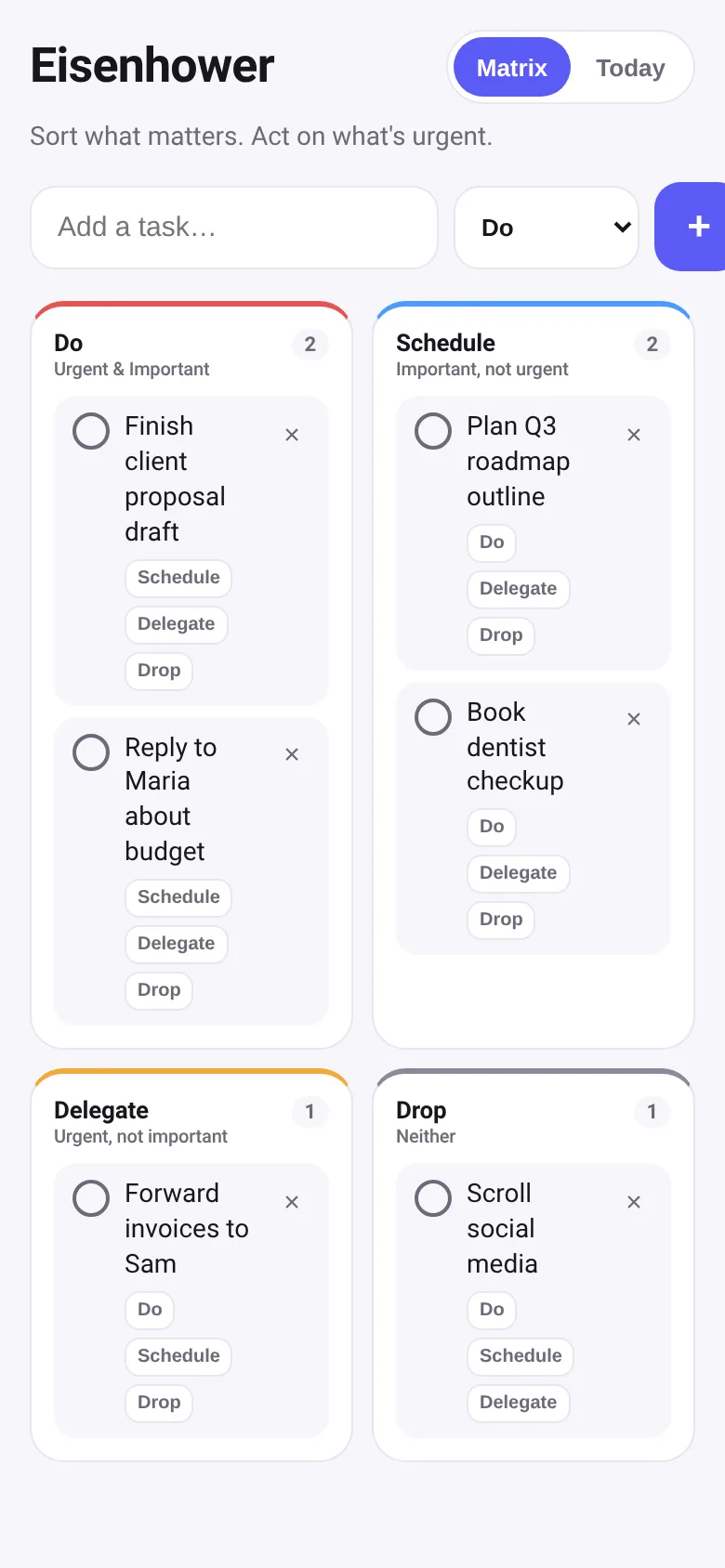
Most people struggle to know which tasks deserve their attention right now. Priority Matrix puts your work into four categories—Do, Schedule, Delegate, or Drop—based on whether each task is urgent and important. You see the full matrix to stay organized across all your priorities, or switch to Today's Focus view to zero in only on the urgent and important work that needs your attention this moment.
What it does
Add a task and choose which quadrant it belongs to. The matrix displays all four categories side by side with task counts for each. Tap a task's checkbox to mark it done with a striking animation, or tap another quadrant label to move it. Switch to Today's Focus view to see only your Do tasks—the urgent and important ones—along with a progress bar showing how many you have completed. All tasks save to your browser automatically.
Key features
- Four-quadrant matrix Organize tasks into Do, Schedule, Delegate, and Drop based on urgency and importance.
- Today's Focus view See only your urgent-important tasks in one place with a progress bar tracking completion.
- Quick task moves Move any task between quadrants by tapping its destination label without leaving the matrix.
- Strike animation Watch tasks get a satisfying line through them when you check them off as done.
- Auto-save All changes save to your browser instantly; no login or sync needed.
How to use it
- Type a task into the input field and pick which quadrant it belongs to from the dropdown.
- Tap the plus button or press Enter to add it to the matrix.
- Tap the checkbox on any task to mark it complete and see the strike animation.
- Tap a quadrant label on a task to move it to a different category.
- Switch to the Today button at the top to see only your urgent-important tasks.
- Tap the X button on any task to delete it.
Who it’s for
Anyone who wants to organize their to-do list by priority and focus first on what is both urgent and important. Useful for busy professionals, project managers, and anyone juggling multiple responsibilities.
What’s new in this version
Added a Today's Focus view that shows only your urgent-important tasks with a progress counter, letting you concentrate on what matters most right now.
The app’s share card (1200×630)
Questions and answers
How do I start using it?
Type any task into the input field, choose which quadrant it fits (Do, Schedule, Delegate, or Drop), and tap the plus button. A few sample tasks load when you first open it.
Does it save my tasks?
Yes. All tasks are saved to your browser automatically. They will still be there when you come back later, as long as you use the same browser and device.
Can I move a task to a different quadrant?
Yes. Tap any of the quadrant labels shown below a task to move it there. Each task shows the other three quadrants as quick-tap options.
What is the Today button for?
Tap Today to see only the tasks in your Do quadrant (urgent and important), along with a progress bar. Switch back to Matrix to see all four categories at once.
More productivity apps
- Historial Clínico Pet · Sistema para registrar y gestionar el historial médico completo de perros y gatos: vacunas, visitas, tratamientos, peso y avisos de vencimiento.
- Pitch Timer · Write cue cards, pick a 30/60/90-second timer, and rehearse your pitch with haptics and per-card timing feedback.
- Pocket Kanban · A minimal kanban board for your phone. Add colored task cards and tap them to move through To do, Doing, and Done with satisfying spring animations.
- Interview Bank · Post and upvote real interview questions by role and type. Mark questions you were asked to build your prep list.
- Study Hours · Log study sessions by subject and minutes. See your group's weekly hours, leaderboard, and a heatmap of the busiest study days.
- Focus Room · Start a focus session with your name and goal, and see who else is focusing right now with live countdowns and today's total minutes.