Mobile app · Music & audio
Guitar chord diagrams with finger numbers and progression builder
Tap a root and type to see exactly where to place your fingers on the fretboard, then play through classic song progressions.
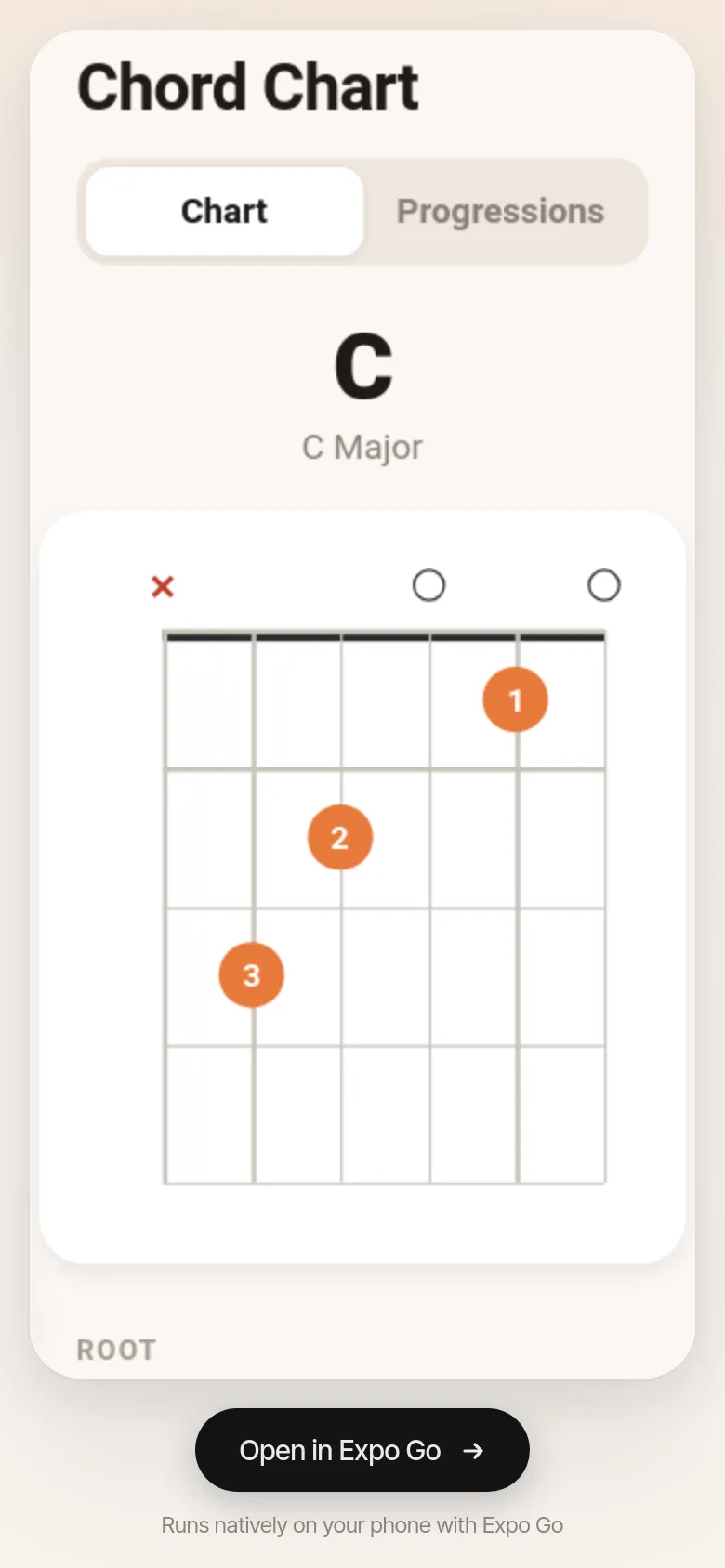
Learning guitar means memorizing chord shapes. This app shows you a clear fretboard diagram for any chord you pick, with numbered fingers showing which string and fret to press. Need to practice progressions? Switch to the progressions tab to step through five built-in song patterns used in pop, blues, folk, and jazz.
What it does
The app has two tabs. In Chart mode, you pick a root note from twelve options (C through B) and a chord type (major, minor, 7, maj7, min7, sus2, sus4, or diminished). A fretboard diagram appears showing which strings are open (small circle), muted (X), and where to place fingers (orange dots with numbers). In Progressions mode, you select from five common patterns—Pop I–V–vi–IV, 12-Bar Blues, Folk I–IV–V, Jazzy ii–V–I, or Sad vi–IV–I–V—then tap through each chord in the sequence.
Key features
- Fretboard diagram with finger numbers Every chord shows an accurate diagram with open and muted strings marked, finger positions in orange, and fret numbers for capo positions.
- Twelve roots and eight chord types Choose any root from C to B and any type from major to diminished, covering common open-position and transposed shapes.
- Five song progressions Step through classic chord patterns used in pop, blues, folk, jazz, and ballad songs.
- Compact and fast The app loads instantly with no bloat, running on phones with smooth animations and haptic feedback.
How to use it
- Open the app and stay in the Chart tab.
- Tap a root note (C, D, E, G, A, etc.) from the grid below the diagram.
- Tap a chord type (Major, Minor, 7, etc.) to see the shape change.
- Switch to the Progressions tab to practice full song patterns by tapping chord names or using Next and Prev buttons.
Who it’s for
Beginner and intermediate guitar players who want a quick reference for chord shapes and practice progressions for common songs.
The app’s share card (1200×630)
Questions and answers
How do I read the fretboard diagram?
The diagram shows six vertical lines (strings) and horizontal lines (frets). Orange dots mark where to place fingers, numbered 1–4 for index through pinky. A small circle means play that string open. An X means don't play that string. If you see a number on the left like '3fr', start from that fret instead of the nut.
Can I save chords or progressions?
The app does not save custom chords or progressions; it shows diagrams and five built-in progressions for quick reference and learning.
Does it work on my phone?
Yes, the app runs on any phone with iOS or Android and adapts to your screen size.
What if I don't see a chord I want?
The app includes shapes for common chords in all twelve keys. If a shape for your root and type isn't available, it transposes the nearest open-position shape automatically.
Remix family
Remixes of this app
- Chord Chart · Leila
More music & audio apps
- Metronome · Keep time with tap tempo, a BPM slider, multiple time signatures, and accented first beats. Essential for musicians and practice sessions.
- Chord Chart · Browse guitar chord shapes with fretboard diagrams, select a chord, and hear it strummed. Browse common progressions and save favorites.
- Chord Chart · Look up guitar chord shapes and step through common progressions. Save your favorite progressions for quick access.