Live shared web app · Productivity
Focus Room: work alongside others in real time
Start a timed focus session, see live countdowns for everyone in the room, and track the group's total minutes focused today.
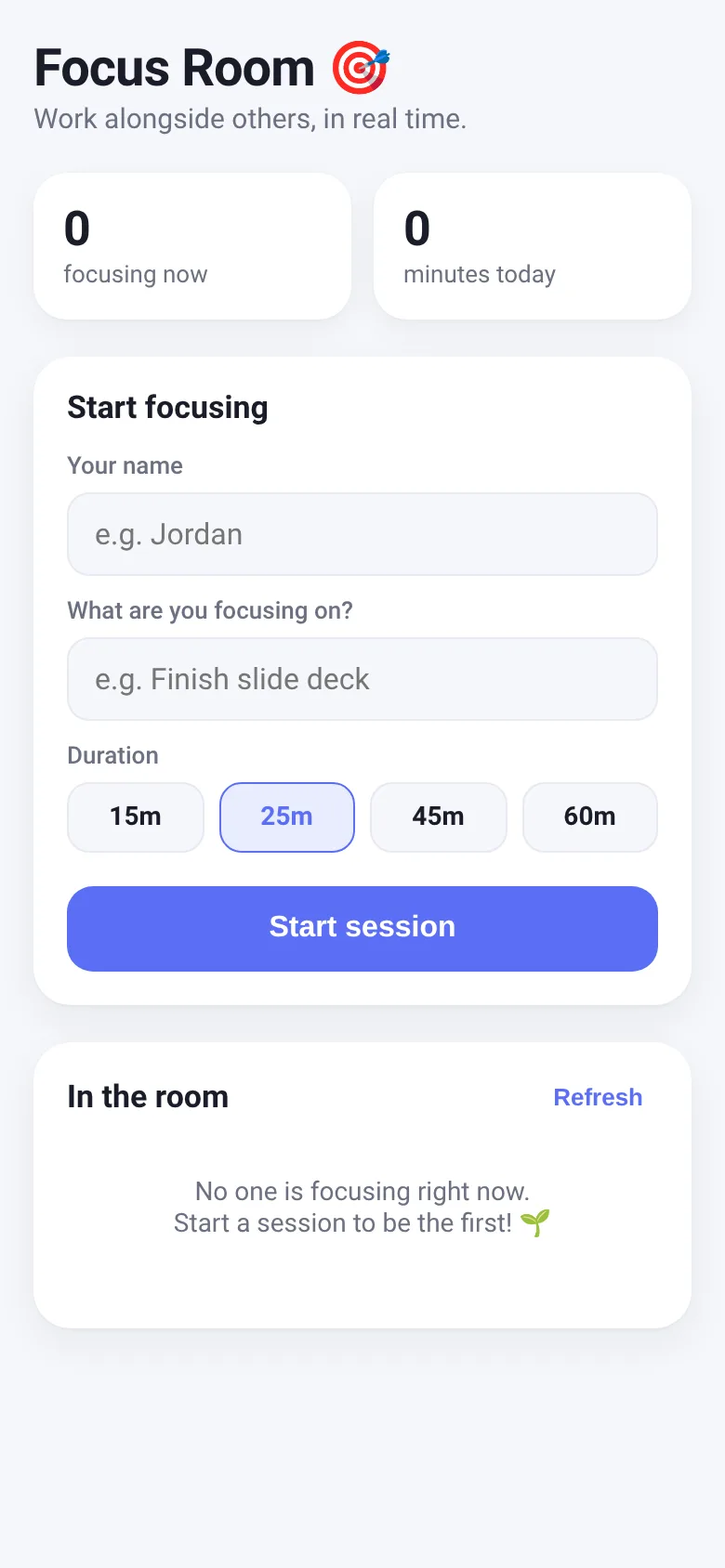
Working alone can feel isolating, and it is easy to lose focus without accountability. Focus Room lets you start a timed focus session with a specific goal, then see who else is focusing right now. You watch a live countdown of your session time and see the names and goals of other people in the room, along with their remaining time. The app also shows how many people are actively focusing and the room's total minutes focused today, creating a sense of shared work and progress.
What it does
When you open Focus Room, you enter your name and goal, then pick a session length from 15, 25, 45, or 60 minutes. Your session appears in the room with a circular timer that counts down. You see a live list of everyone else focusing right now, with their names, goals, and countdown timers. If your session ends early, you can stop it manually. The app tracks your previous name so you do not have to type it each time. All data is live: when anyone starts or ends a session, everyone in the room sees it immediately.
Key features
- Live focus countdown Watch a circular timer for your own session and see everyone else's remaining time update every second.
- Active focuser list See the names and goals of everyone currently focusing, sorted by most recent start time.
- Room stats View how many people are focusing now and the total minutes the room has focused today.
- Name memory Your name saves to your device so you do not need to type it every time.
- Session history Past sessions remain visible for 24 hours so the daily total includes all completed work.
How to use it
- Enter your name and the goal you are focusing on.
- Choose your session length from 15, 25, 45, or 60 minutes.
- Tap Start session and watch your countdown timer begin.
- See other focusers appear in the room list as they join.
- End your session early by tapping the End session button, or let the timer run out.
Who it’s for
Anyone who wants to focus better through accountability and the presence of others. Works for remote workers, students, freelancers, or anyone using a structured focus method like the Pomodoro Technique.
What’s new in this version
The latest version added room stats that show the number of active focusers and the total minutes everyone in the room has focused today, giving you visibility into the group's productivity.
The app’s share card (1200×630)
Questions and answers
Does my progress save if I close the app?
Your current session is saved to your device. If you close the app and reopen it before your session ends, it will still be active. Once a session ends or you manually stop it, that session is recorded and the timer is no longer stored.
Can I see who focused last week or earlier?
The app shows only today's sessions. It tracks the total minutes from all sessions that started or ran today, but does not display a history from previous days.
Does this work on my phone?
Yes. Focus Room is a web app that works on any device with a web browser, including phones and tablets.
What if I want to take a break between sessions?
End your current session, and then start a new one whenever you are ready. The app does not enforce breaks, so you control the timing.
More productivity apps
- Community Beat · साझा बीट बनाएँ: स्टेप दबाएँ, डीजे प्रीसेट चुनें, और सब मिलकर संगीत तैयार करें। वीडियो में एक्सपोर्ट करें।
- Community Beat · Tap drum steps on a shared 16-step beat that everyone editing it hears together. Load DJ presets, mute and solo tracks, export video or audio.
- Meow Translator · Tap to decode your cat's meows into theatrical translations, then blast them with a dramatic soundboard. Fun for cat lovers and parties.
- Historial Clínico Pet · Sistema para registrar y gestionar el historial médico completo de perros y gatos: vacunas, visitas, tratamientos, peso y avisos de vencimiento.
- Haunted Beat · A shared drum machine where everyone taps the grid together to build beats. Dancing pumpkins groove to the rhythm you create.
- Community Beat · Coloca casillas en pistas de batería y escucha el patrón que todos construyen juntos en tiempo real. Exporta tu sesión como video o audio.