Live shared web app · Music & audio
Haunted Beat: Make Beats Together
Tap a grid with others in real time. Five spooky presets get you started. Export your beat as video.
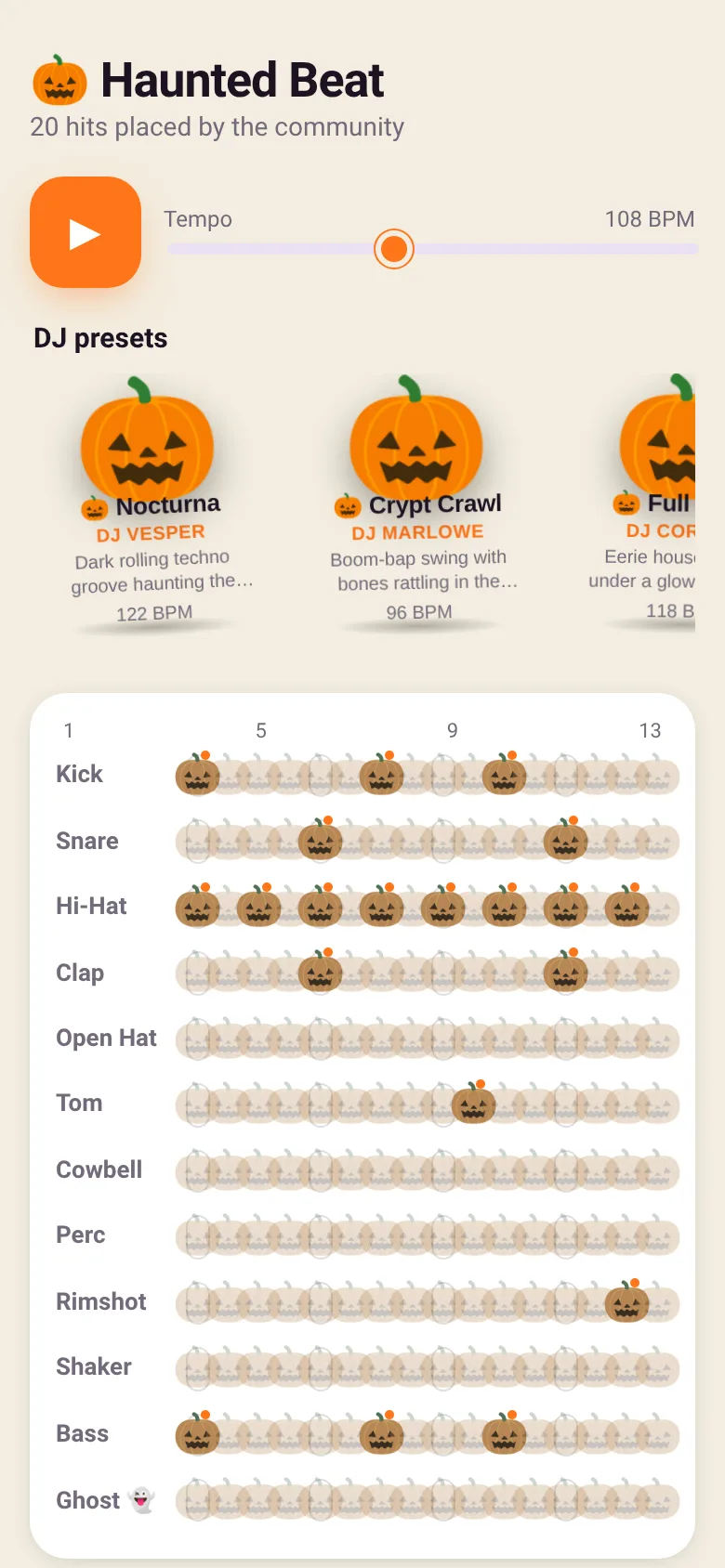
You want to make electronic music with friends without needing software or files. Haunted Beat is a web sequencer where every person who opens it sees and shapes the same 16-step drum grid. Tap any cell to place a drum hit. Everyone sees it happen instantly. Five Halloween-themed presets—Nocturna, Crypt Crawl, Full Moon, Cursed 808, and Witches' Bash—show what grooves feel right. Adjust the tempo from 70 to 160 BPM. Watch a feed of who hit what, and when you are happy, export the result as a video.
What it does
The app shows a 4-by-16 grid. Each row is a drum sound: kick, snare, hi-hat, clap, and more, including a ghost sound. Each column is a sixteenth-note step. Tap a cell to toggle a hit. When you play, the grid pulses to the beat and plays back all the hits everyone has placed. A side panel shows recent community activity with names and timestamps. Preset buttons load ready-made drum patterns and set the tempo. A video export tool captures 4, 8, or 16 bars with all hits and lets you download it.
Key features
- Live Shared Grid Every person who opens the app sees and can tap the same 16-step sequencer; all hits appear instantly for everyone.
- Five Halloween Presets Load Nocturna, Crypt Crawl, Full Moon, Cursed 808, or Witches' Bash to start with a full groove and preset tempo.
- Twelve Drum Sounds Choose from kick, snare, hi-hat, clap, open hat, tom, cowbell, perc, rimshot, shaker, bass, and ghost to build your beat.
- Tempo Control Slide the tempo from 70 to 160 BPM to speed up or slow down the entire sequence.
- Activity Feed See who placed which drum hit and when, so you know who you are making music with.
- Export as Video Save your beat as a WebM video file in 4-, 8-, or 16-bar lengths, or export audio only.
How to use it
- Open the app on a phone or computer; wait for it to connect to the shared beat.
- Tap a cell in the grid to place a drum hit; tap again to remove it.
- Adjust the tempo slider to change the speed, then hit play to hear the beat.
- Try a preset button to load a ready-made pattern, or keep tapping to make your own.
- Watch the activity feed to see what others are adding in real time.
- Click Export Video to save your beat as a downloadable file.
Who it’s for
Musicians, friends making music together, anyone curious about drum sequencers, and people looking for a fun group activity during Halloween or anytime.
What’s new in this version
The latest update makes each grid cell look and dance like a pumpkin that bops to the beat, replacing the plain card look with a spooky Halloween visual theme.
How it differs from Community Beat
Haunted Beat is a Halloween remix of Community Beat. It adds five spooky drum presets and replaces the generic grid cells with dancing pumpkin graphics that move to the rhythm, turning an abstract sequencer into a festive group experience.
The app’s share card (1200×630)
Questions and answers
Do I need an account?
No. Open the app and start tapping. Your hits are shared live with everyone on the same beat.
Can I save my beat?
Yes. Use the Export Video button to download your sequence as a WebM video or audio file. The shared beat itself stays on the web app for others to see and edit.
Does it work on my phone?
Yes. The app is built for web and works on phones, tablets, and computers in any modern browser.
Can I share a link to the beat with friends?
Yes. Share the web app URL with others, and when they open it, they will join the same live beat and see all the hits in real time.
Remix family
Remixed from Community Beat · by Edgar Durand Díaz
More music & audio apps
- Community Beat · साझा बीट बनाएँ: स्टेप दबाएँ, डीजे प्रीसेट चुनें, और सब मिलकर संगीत तैयार करें। वीडियो में एक्सपोर्ट करें।
- Meow Translator · Tap to decode your cat's meows into theatrical translations, then blast them with a dramatic soundboard. Fun for cat lovers and parties.
- Community Beat · A shared step sequencer where everyone taps, plays, and exports drum beats together live. Create group rhythms and download video or audio.
- Chord Charts · Pick a root note and chord type to see a fretboard diagram with finger positions. Build common song progressions step by step.
- Icebreakers · Swipe through fun, deep, work, and family icebreaker questions and save your favorites for parties and teams.
- Charades · Pick a category, flip words for 60 seconds, tap to score, and track team totals per round.