Web app · Money
Compare job offers with weighted scoring
Enter offer details, weight what matters to you, and see total value scores and radar charts to compare offers at a glance.
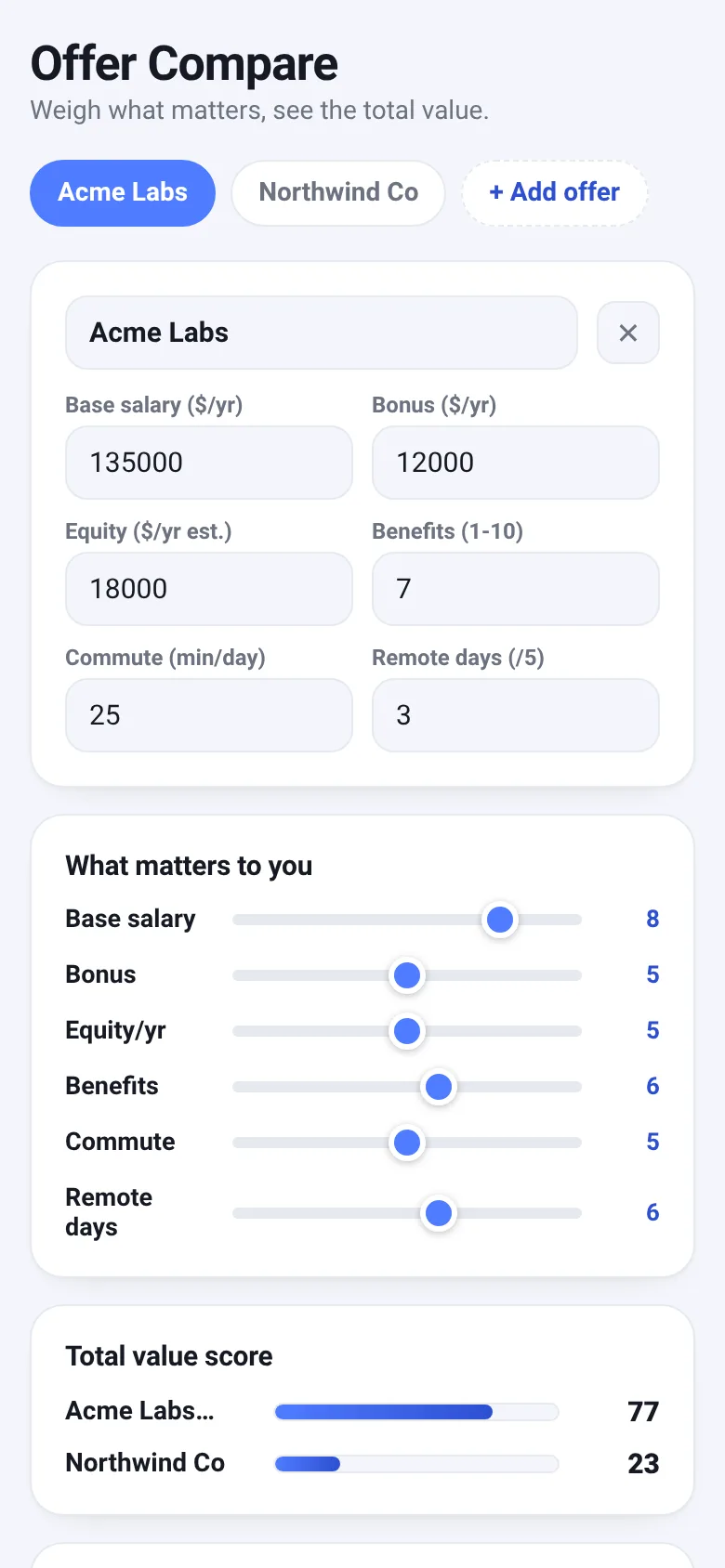
Choosing between job offers means weighing many different factors—base pay, bonus, equity, benefits, commute time, and remote flexibility—but they're measured in different units and matter differently to each person. Offer Compare lets you enter the numbers from each offer, set how much each factor matters to you on a sliding scale, and instantly see which offer comes out ahead overall through a weighted score and visual radar chart.
What it does
You enter details for up to four job offers: base salary, annual bonus, estimated annual equity value, benefits rating, commute time in minutes, and remote days per week. You then adjust sliders to assign weights to each factor based on your priorities. The app calculates a normalized score for each offer, accounting for the range of values across offers and penalizing long commutes while rewarding remote flexibility. Results display a ranked score bar chart, a multi-offer radar chart showing how each offer compares across all six dimensions, and a raw-numbers table for reference.
Key features
- Weighted scoring Adjust importance of each factor on a 0–10 scale; your priorities change the final score in real time.
- Radar chart comparison Visual six-axis chart overlays all offers to spot strengths and weaknesses at a glance.
- Total value score Ranked bar chart shows each offer's overall score out of 100, normalized across all your inputs.
- Up to four offers Compare multiple job options without cluttering the interface.
- Local storage Your offer details and weight preferences save automatically in your browser.
- Sample offers Starts with two realistic examples so you can immediately see how the tool works.
How to use it
- Enter your first job offer's company name and details: salary, bonus, equity estimate, benefits score, commute minutes, and remote days per week.
- Add a second or third offer using the Add Offer tab, filling in its details the same way.
- Adjust the importance sliders in the What Matters to You section to reflect your priorities.
- Review the Total Value Score bar chart to see which offer ranks highest.
- Study the Radar Comparison chart to see how offers differ on each dimension.
Who it’s for
Job seekers and career changers evaluating multiple competing offers, who want an objective, data-driven way to compare beyond gut feeling.
The app’s share card (1200×630)
Questions and answers
Do you save my offers and weights?
Yes, Offer Compare saves everything to your browser's local storage. Your data stays on your device and is never sent anywhere.
Can I use this on my phone?
Yes, it works on phones, tablets, and desktops. The form inputs and charts adapt to your screen size.
How does the scoring work?
Each factor is normalized to a 0–1 scale based on the range across your offers. Commute time is inverted so lower is better. Your weight sliders multiply each factor's score, and the weighted average becomes your total score out of 100.
Can I compare more than four offers?
The app caps comparison at four offers to keep the interface readable. You can delete an offer and add a new one to swap it out.
More money apps
- Historial Clínico Pet · Sistema para registrar y gestionar el historial médico completo de perros y gatos: vacunas, visitas, tratamientos, peso y avisos de vencimiento.
- Pitch Timer · Write cue cards, pick a 30/60/90-second timer, and rehearse your pitch with haptics and per-card timing feedback.
- Pocket Kanban · A minimal kanban board for your phone. Add colored task cards and tap them to move through To do, Doing, and Done with satisfying spring animations.
- Budget Envelopes · Track spending across monthly budget envelopes like groceries and transport. Add expenses with a quick keypad and watch animated fill levels show how much you
- Interview Bank · Post and upvote real interview questions by role and type. Mark questions you were asked to build your prep list.
- Study Hours · Log study sessions by subject and minutes. See your group's weekly hours, leaderboard, and a heatmap of the busiest study days.