Web app · Food & drink
Baker's Math: from flour weight to bake schedule
Adjust hydration, salt, and leaven percentage sliders to generate a gram-by-gram recipe and a step-by-step dough timeline.
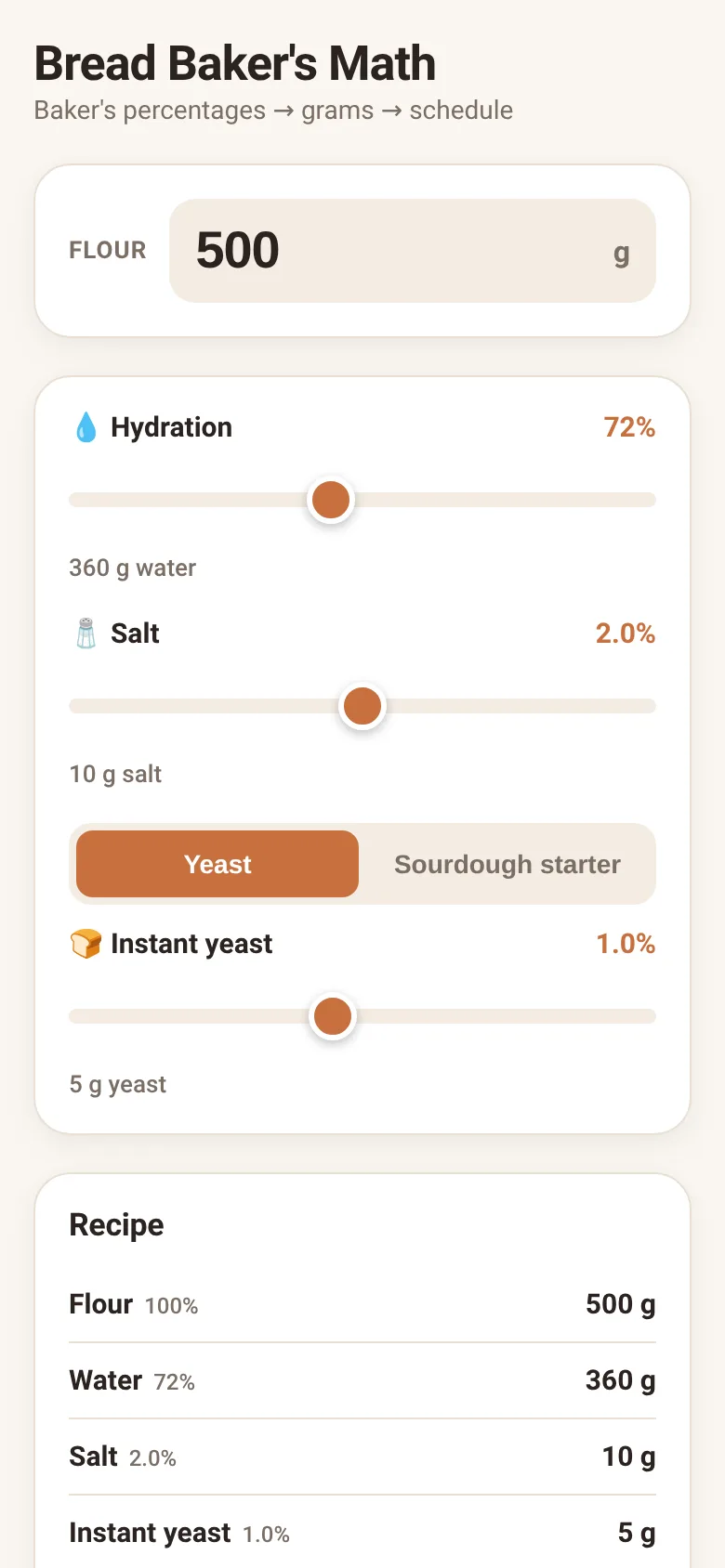
Bread recipes are easier to scale and troubleshoot when you think in baker's percentages—where all ingredients are expressed as a percentage of flour weight. This app starts with your flour amount, then lets you dial in hydration (water), salt, and leaven (yeast or sourdough starter) with sliders. It instantly shows you the exact grams you need and builds a realistic fermentation schedule tailored to your choices.
What it does
Enter a flour weight in grams, then use three sliders to set hydration (50–100%), salt (1–3%), and leaven percentage. The app calculates the weight of water, salt, and leaven in grams, displays them in a recipe list with total dough weight, and generates a detailed dough schedule showing mix time, bulk fermentation hours, shaping, proofing duration, and baking temperature. The timeline adjusts automatically based on your hydration level and whether you choose instant yeast or sourdough starter.
Key features
- Flour input Set your starting flour weight from 50 to 5000 grams; all other amounts scale from this baseline.
- Hydration slider Adjust water content from 50% to 100% of flour weight; the app notes whether the hydration is high, balanced, or stiff.
- Leaven toggle Switch between instant yeast (0.2–2%) and sourdough starter (5–30%) to see how leaven type and amount change fermentation times.
- Gram-by-gram recipe View flour, water, salt, and leaven weights in grams alongside their baker's percentages.
- Dough schedule Get a five-step timeline with mix, bulk ferment, shape, proof, and bake instructions, including temperatures and handling notes.
- State saving Your last flour weight, hydration, salt, leaven amount, and leaven type are saved to your browser so you can pick up where you left off.
How to use it
- Enter your desired flour weight in grams.
- Drag the hydration slider to adjust water content; watch the grams update.
- Set salt and leaven percentages with their sliders.
- Toggle between yeast and sourdough starter to see different fermentation schedules.
- Read the recipe list and follow the dough schedule from mix through bake.
Who it’s for
Home bakers and sourdough enthusiasts who want precise, scalable recipes and a realistic fermentation timeline without guesswork.
The app’s share card (1200×630)
Questions and answers
How do I start?
Enter your flour weight, then use the three sliders to set hydration, salt, and leaven. The app calculates everything and shows your recipe and schedule instantly.
Does my recipe save?
Yes. The app saves your flour weight, hydration, salt, leaven amount, and leaven type to your browser automatically, so you can close and return to your recipe later.
Can I use this on my phone?
Yes. The app works on any device with a web browser and responds to touch input on the sliders.
What is baker's percentage?
Baker's percentage expresses all ingredients as a percentage of flour weight. Flour is always 100%; if your recipe has 72% hydration, water weighs 72% of the flour. This makes recipes easy to scale.
More food & drink apps
- Icebreakers · Swipe through fun, deep, work, and family icebreaker questions and save your favorites for parties and teams.
- Pitch Timer · Write cue cards, pick a 30/60/90-second timer, and rehearse your pitch with haptics and per-card timing feedback.
- Sun Arc · See the sun's arc across the sky for any latitude and day, with sunrise, sunset, day length, and golden hour windows.
- Big Text · Flash giant text across a room in auto-fit or scrolling marquee mode, with color themes and a gentle blink for safety.
- Shot List · Plan video scenes with shot cards, durations, and location tags. Check off shots as you film to track progress.
- Tally Counter · Track multiple named counts with big tap targets, haptics feedback, and one-tap undo on reset.