Web app · Tools & utilities
Check color contrast against WCAG AA and AAA standards
Pick text and background colors, see your contrast ratio and WCAG pass status, and get automatic fixes for failing pairs.
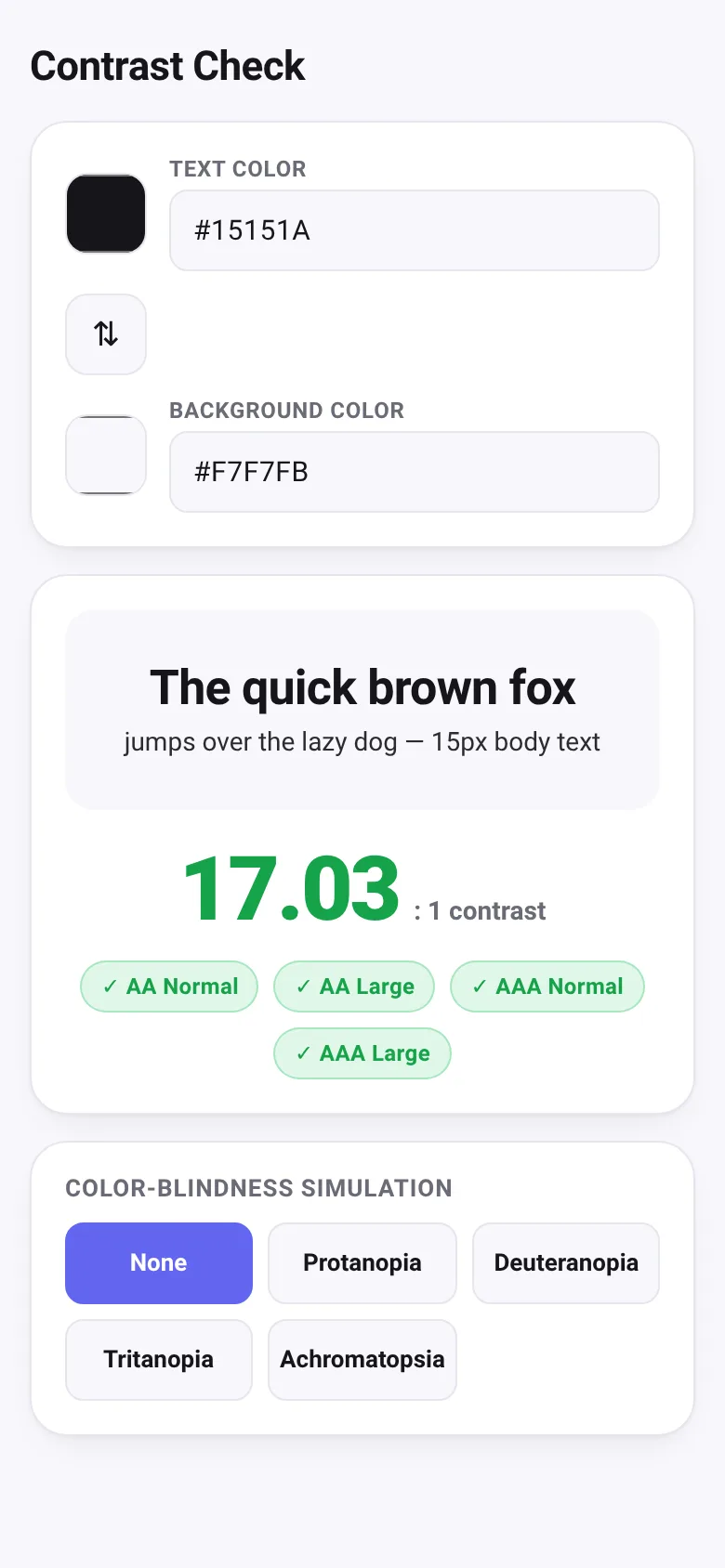
Choosing colors for text and backgrounds is tricky: what looks good may be hard to read. Contrast Checker solves this by letting you pick any two colors and instantly showing whether they meet WCAG AA or AAA standards. If they fail, the tool suggests the nearest color that passes, so you can adjust with confidence.
What it does
You pick a text color and background color using color pickers or by typing hex codes. The app shows a live preview with sample text, displays the contrast ratio as a large number, and marks which WCAG levels (AA Normal, AA Large, AAA Normal, AAA Large) your pair passes. If the text color fails AA, a suggestion box appears with the nearest passing text color you can apply with one click. You can also swap the two colors, view how the pair looks to people with color blindness (protanopia, deuteranopia, tritanopia, or achromatopsia), and type or paste hex values directly.
Key features
- Live contrast ratio See the exact contrast ratio between your colors and instantly know if it meets AA or AAA.
- Automatic color suggestion When colors fail, get the nearest passing color for text and apply it with one button.
- Color-blindness simulation Toggle between normal vision and five color-blindness modes to see how your pair appears to others.
- Color picker and hex input Choose colors with a visual picker or paste and edit hex codes directly.
- Live preview text See your colors applied to real sample text at two sizes to judge readability.
- Swap colors Quickly reverse text and background to explore alternatives.
How to use it
- Click the text color swatch or type a hex code to set your text color.
- Click the background color swatch or type a hex code to set your background.
- Read the contrast ratio and check which WCAG levels pass (green) or fail (red).
- If text fails AA, click 'Use this' to apply the suggested passing color.
- Click a color-blindness mode button to see how your pair looks to people with that vision type.
Who it’s for
Web designers, developers, and content creators who need to ensure text is readable and meets accessibility standards.
What’s new in this version
Latest update added color-blindness simulation modes (protanopia, deuteranopia, tritanopia, achromatopsia) so you can see how your color choices appear to people with color vision deficiency.
The app’s share card (1200×630)
Questions and answers
Do my color choices get saved?
No, the app does not save your choices. Each time you load it, you start with the default text and background colors.
Can I use this on my phone?
Yes, it works on phones and tablets. Color pickers and hex input fields work on all devices.
What is WCAG contrast and why does it matter?
WCAG (Web Content Accessibility Guidelines) contrast ratios measure how visually distinct text is from its background. Higher contrast helps people with low vision or color blindness read text. AA is the standard requirement; AAA is stricter.
Can I share or export my results?
The app does not have a built-in share or export feature. You can take a screenshot or note the hex codes and contrast ratio manually.
More tools & utilities apps
- Icebreakers · Swipe through fun, deep, work, and family icebreaker questions and save your favorites for parties and teams.
- Pitch Timer · Write cue cards, pick a 30/60/90-second timer, and rehearse your pitch with haptics and per-card timing feedback.
- Sun Arc · See the sun's arc across the sky for any latitude and day, with sunrise, sunset, day length, and golden hour windows.
- Big Text · Flash giant text across a room in auto-fit or scrolling marquee mode, with color themes and a gentle blink for safety.
- Shot List · Plan video scenes with shot cards, durations, and location tags. Check off shots as you film to track progress.
- Tally Counter · Track multiple named counts with big tap targets, haptics feedback, and one-tap undo on reset.