Mobile app · Money
Expense Snap: Track spending by category
Log expenses instantly and see today's total, weekly spending, and category breakdown in real time.
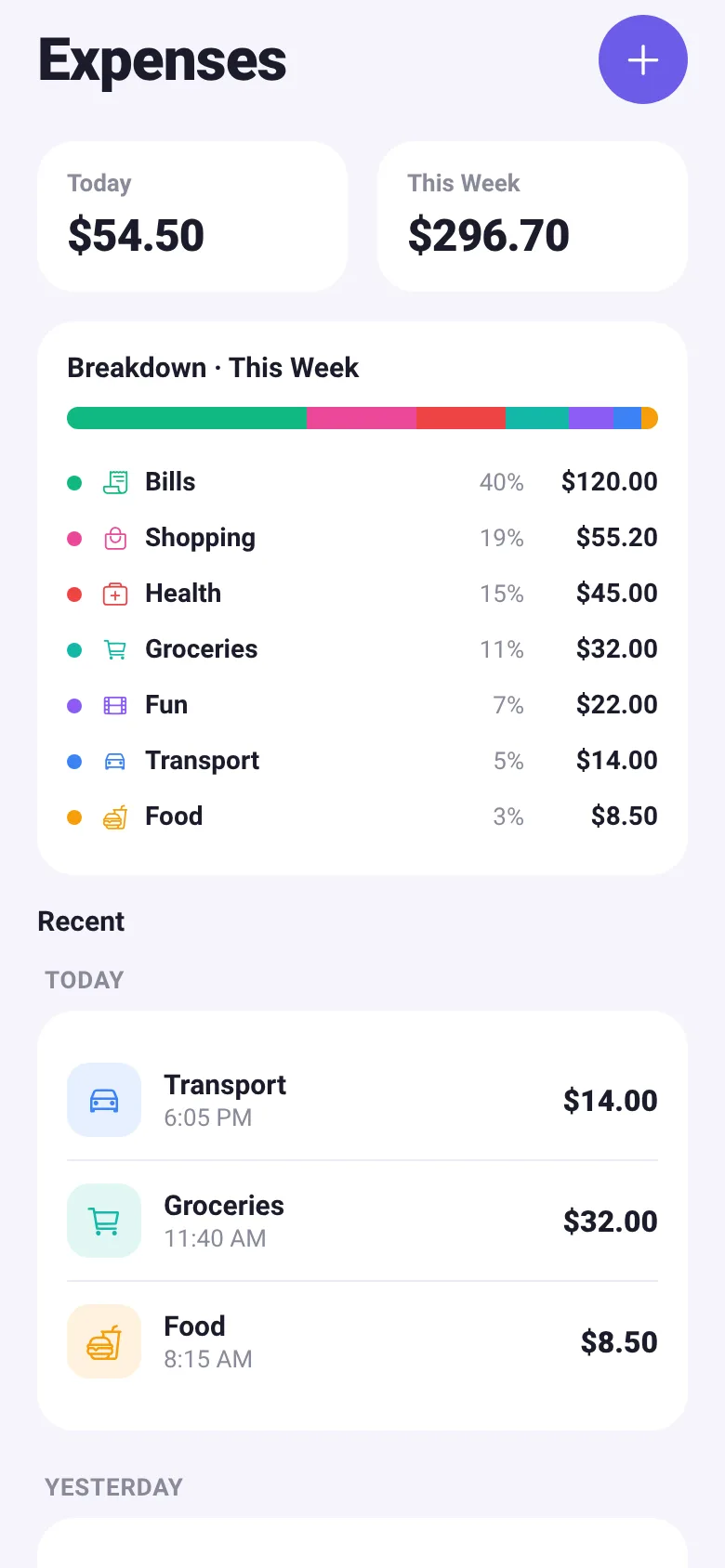
Keeping track of where your money goes is hard when you spend throughout the day. Expense Snap lets you quickly log each purchase into one of eight common categories—food, groceries, transport, shopping, bills, fun, health, or other—then see your spending patterns immediately. The app shows you today's total and this week's total side by side, plus a visual breakdown of how much you spent in each category this week.
What it does
When you open Expense Snap, you see your total spending for today and this week in two summary cards. Below that is a visual breakdown of this week's spending: a colored bar shows each category's proportion, and a detailed list shows the percentage and dollar amount for each. Tap the plus button to log a new expense, enter the amount, pick a category by icon, and save it. All expenses appear in a reverse-chronological list grouped by day—Today, Yesterday, or a date. Long-press any expense to delete it.
Key features
- Today and Weekly Totals See how much you spent today and in the current week side by side.
- Category Breakdown Visual stacked bar and detailed legend show what percentage of this week's spending went to each category.
- Quick Entry Tap plus, enter amount, select category, and save—expense logged with a timestamp.
- Time-Grouped History All expenses sorted newest first and grouped by day label: Today, Yesterday, or specific dates.
- Eight Categories Food, Groceries, Transport, Shopping, Bills, Fun, Health, and Other cover most daily spending.
- Delete by Long Press Long-press any expense to confirm and remove it from your history.
How to use it
- Open the app and review your Today and This Week totals on the summary cards.
- Tap the plus button in the top right to open the expense entry form.
- Type the amount, select a category by tapping its icon, then tap Add Expense.
- Scroll through the Recent section to see all your logged expenses grouped by day.
- Long-press any expense to delete it if you made a mistake.
- Check the Breakdown card to see which categories are costing you the most this week.
Who it’s for
Anyone who wants to track daily spending without a complicated setup—students, freelancers, anyone curious about where their cash goes each week.
The app’s share card (1200×630)
Questions and answers
How do I start tracking?
Tap the plus button and enter an amount. Pick a category and tap Add Expense. It logs instantly with the current time.
Does the app save my expenses?
Yes, expenses are stored while the app is open. The app comes with sample expenses so you can see how it works right away.
Can I run this on my phone?
Yes, Expense Snap runs on iOS and Android phones using React Native.
What if I enter an expense by mistake?
Long-press the expense in the Recent list and tap Delete to confirm removal.
More money apps
- Historial Clínico Pet · Sistema para registrar y gestionar el historial médico completo de perros y gatos: vacunas, visitas, tratamientos, peso y avisos de vencimiento.
- Pitch Timer · Write cue cards, pick a 30/60/90-second timer, and rehearse your pitch with haptics and per-card timing feedback.
- Pocket Kanban · A minimal kanban board for your phone. Add colored task cards and tap them to move through To do, Doing, and Done with satisfying spring animations.
- Budget Envelopes · Track spending across monthly budget envelopes like groceries and transport. Add expenses with a quick keypad and watch animated fill levels show how much you
- Interview Bank · Post and upvote real interview questions by role and type. Mark questions you were asked to build your prep list.
- Study Hours · Log study sessions by subject and minutes. See your group's weekly hours, leaderboard, and a heatmap of the busiest study days.