Web app · Tools & utilities
Moon Phase
See today's moon with an accurate drawn image, find when the next full and new moons occur, and browse a full month of lunar phases.
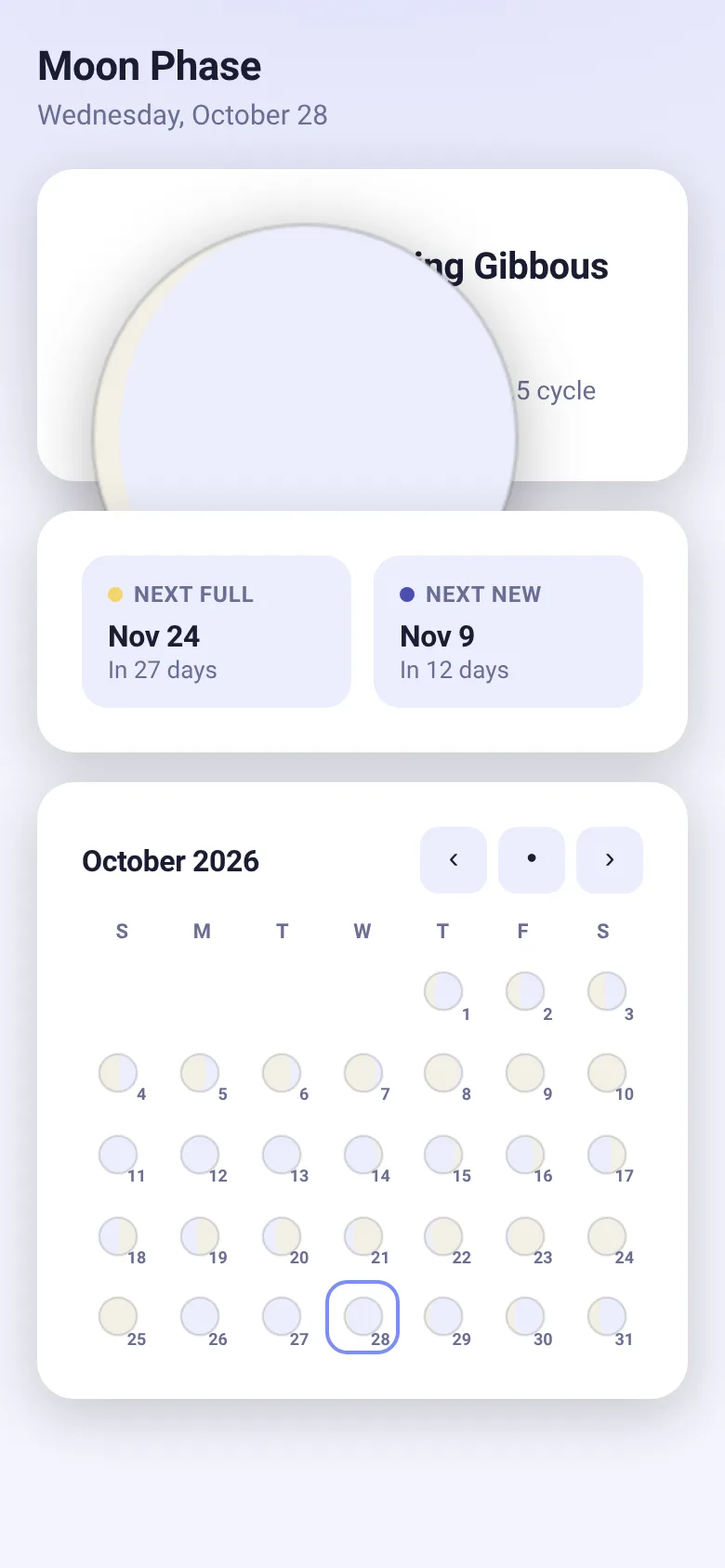
Want to know what the moon looks like tonight or plan around lunar events? Moon Phase computes your current moon phase locally and shows it as an accurate hand-drawn disk. You see the exact percentage lit, the phase name, and how many days into the lunar cycle you are. The app also tells you when the next full and new moons arrive, and displays a calendar grid of tiny moons for every day of the month so you can see the whole cycle at a glance.
What it does
When you open Moon Phase, you see today's date and a large, accurately shaded drawing of the current moon. Beside it are the phase name (New Moon, Waxing Crescent, Full Moon, and so on), the percentage of the moon that is lit, and which day of the 29.5-day lunar cycle you are on. Below that, a card shows the date and countdown to the next full moon and next new moon. At the bottom, a calendar displays every day of the current month with a tiny moon drawn for each day, shaded to match its phase. Use the month navigation buttons to step through other months.
Key features
- Accurate moon drawing The moon is drawn with correct illumination for today based on the lunar cycle, showing which edge is lit as the moon waxes and wanes.
- Phase information Displays the phase name, percentage lit, and the current day and length of the lunar cycle.
- Next events Shows the exact date of the next full and new moon, and how many days away each is.
- Monthly calendar Browse any month and see tiny moon drawings for each day, with today highlighted if viewing the current month.
- Month navigation Step backward and forward through months, or jump back to today with a single button.
How to use it
- Open the app to see today's moon phase as a large shaded circle.
- Read the phase name and illumination percentage to the right of the moon drawing.
- Look at the next full and new moon dates below to plan ahead.
- Scroll or view the calendar grid at the bottom to see moons for the entire month.
- Use the left and right arrows to move to other months, or click the dot to return to this month.
Who it’s for
Anyone curious about the moon's current appearance, anyone planning outdoor or night-sky activities, and anyone interested in tracking lunar cycles.
What’s new in this version
The latest update ensures the moon phase is computed locally with an accurate drawn illumination, next full and new moon dates are always available, and the month calendar shows the phase for every day, all within a compact under-30 KB implementation.
The app’s share card (1200×630)
Questions and answers
Does the app work offline?
Yes. Moon Phase calculates the phase based on the date in your device and needs no internet connection.
Does it save my progress or preferences?
The app shows today's moon phase and calendar each time you open it; it does not store saved data or settings.
Can I use it on my phone?
Yes. Moon Phase is a web app that works on any device with a browser, including phones and tablets.
How accurate is the moon phase?
The moon phase is calculated using the known lunar cycle length and a reference new moon date, and is accurate for any date you view.
More tools & utilities apps
- Icebreakers · Swipe through fun, deep, work, and family icebreaker questions and save your favorites for parties and teams.
- Pitch Timer · Write cue cards, pick a 30/60/90-second timer, and rehearse your pitch with haptics and per-card timing feedback.
- Sun Arc · See the sun's arc across the sky for any latitude and day, with sunrise, sunset, day length, and golden hour windows.
- Big Text · Flash giant text across a room in auto-fit or scrolling marquee mode, with color themes and a gentle blink for safety.
- Shot List · Plan video scenes with shot cards, durations, and location tags. Check off shots as you film to track progress.
- Tally Counter · Track multiple named counts with big tap targets, haptics feedback, and one-tap undo on reset.