Web app · Tools & utilities
Move Planner
Set your move date and follow a week-by-week checklist, track packing progress by room, and print labels for your boxes.
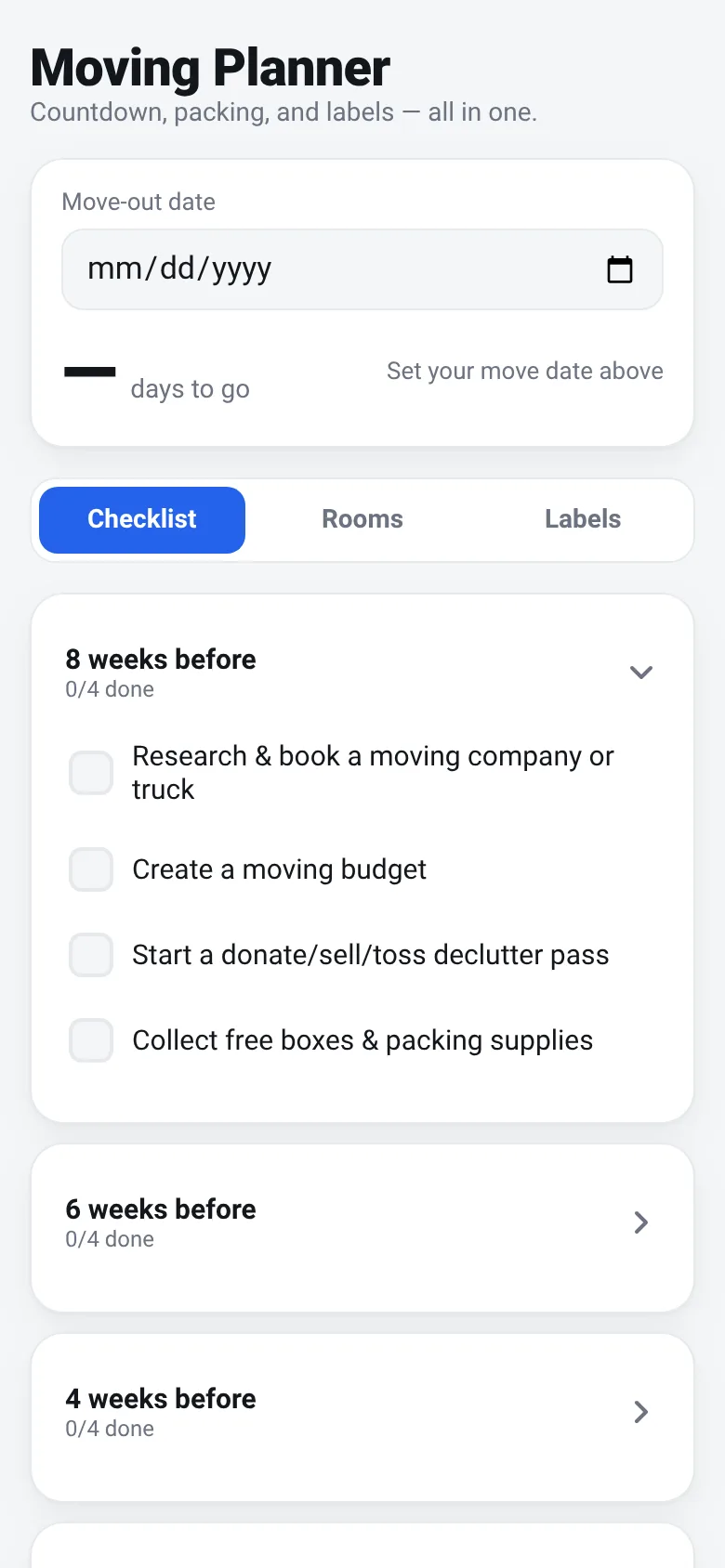
Moving involves a lot of tasks spread across weeks, from notifying utilities to packing room by room. Move Planner puts everything in one place: a countdown timer, a checklist organized by weeks, progress rings for each room, and a tool to create and print box labels. Check off tasks as you go, adjust your packing percentage per room, and print labels whenever you box something up.
What it does
You enter your move-out date at the top. The app shows a countdown in days and displays six week-based checklist sections (8 weeks before through moving day), each with 3–4 specific tasks like booking movers, changing utilities, packing by room, and updating your address. The Rooms tab shows a ring chart for each room (Kitchen, Living Room, Bedroom, Bathroom, Office, Garage) with a percentage you adjust up or down as you pack. The Labels tab lets you fill in a room, box number, contents, and a fragile flag; you see a preview of the label and can save it to a list, then print one label or all at once. All data is saved in your browser.
Key features
- Week-by-week countdown checklist Tasks organized from 8 weeks before moving day through moving day itself, with check-off boxes and progress count per week.
- Packing progress rings by room Visual percentage tracker for each room (Kitchen, Living Room, Bedroom, Bathroom, Office, Garage) that you adjust in 10% steps.
- Box label maker and printer Enter room, box number, contents, and fragile status; preview the label and print one or all saved labels at once.
- Live countdown timer Shows days remaining to your move date, updated in real time, and highlights the current week in the checklist.
- Browser storage All your checklist progress, room percentages, and box labels save automatically to your device.
How to use it
- Click the date input and set your move-out date.
- Review the six-week checklist and tick off tasks as you complete them.
- Go to the Rooms tab and adjust the packing percentage for each room.
- Switch to the Labels tab, enter room and contents, and add each box label to your list.
- Click Print to generate labels for your boxes, then print them from your browser.
Who it’s for
Anyone planning a residential move who wants a simple, all-in-one tool to track tasks, monitor packing progress, and create box labels.
The app’s share card (1200×630)
Questions and answers
Does the app save my progress?
Yes. Your move date, checked tasks, room progress, and saved labels are all stored in your browser's local storage. They persist as long as you don't clear your browser data.
Can I use this on my phone?
Yes. The app is fully responsive and works on mobile phones, tablets, and desktop browsers.
How do I print the box labels?
Fill in the label details and click Add Label. Then click Print next to a single label, or click Print All to print all your labels at once. Your browser's print dialog will open; choose your printer and paper size.
What if I want to change my move date?
Just click the date input at the top and select a new date. Your checklist will reorganize to reflect which week is current, and all your progress will stay.
More tools & utilities apps
- Pesca Tranquila · Juego de pesca sin apuros donde lanzás, recogés peces, completás tu álbum de especies y mejorás tu equipo.
- Icebreakers · Swipe through fun, deep, work, and family icebreaker questions and save your favorites for parties and teams.
- Pitch Timer · Write cue cards, pick a 30/60/90-second timer, and rehearse your pitch with haptics and per-card timing feedback.
- Sun Arc · See the sun's arc across the sky for any latitude and day, with sunrise, sunset, day length, and golden hour windows.
- Big Text · Flash giant text across a room in auto-fit or scrolling marquee mode, with color themes and a gentle blink for safety.
- Shot List · Plan video scenes with shot cards, durations, and location tags. Check off shots as you film to track progress.