Mobile app · Social & party
Nova Chat: Chatbot that works offline and online
Chat with an AI that knows facts, math, and drawing. Switches between offline mode with built-in knowledge and online mode that searches the web.
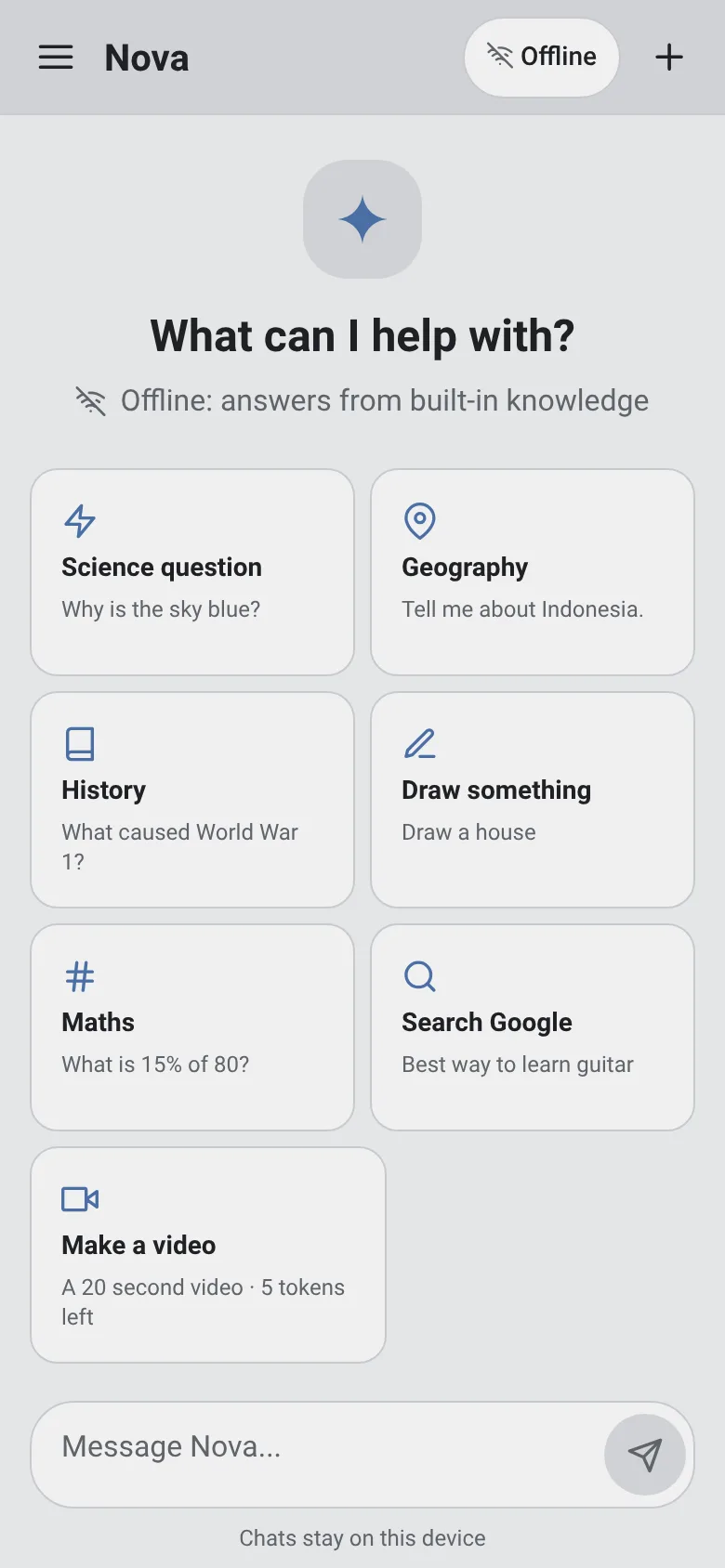
You want quick answers whether you have internet or not. Nova Chat answers from its built-in library of science, geography, history, technology, nature, and health facts. When online, it looks up information on Wikipedia, checks weather, and searches Google. It also does math calculations, unit conversions, draws simple pictures, and can make short videos from text descriptions. Your chats stay on your device.
What it does
Open Nova and start typing questions or commands. In offline mode, Nova answers from memory about science, geography, history, tech, nature and health, and solves math problems. Toggle to online mode to let it search Wikipedia for definitions, fetch weather for a place, and open Google searches in an in-app browser. Ask it to draw or make a video and Nova creates one on your device. The app keeps your 10 most recent chats so you can go back to them anytime.
Key features
- Offline and online modes Switch between offline (uses built-in knowledge) and online (searches Wikipedia, definitions, weather, Google) with one tap.
- Calculator Type math like (12+8)*3/4 or open the calculator keypad from the menu. Works in both offline and online modes.
- Video creation Ask Nova to make a 10 to 75 second video about any topic and it builds one on your device using a token system.
- Drawing Request simple drawings and Nova creates them for you to view in chat.
- Chat history Save your 10 most recent chats on this device. Start an 11th chat and the oldest one is removed.
- Dark mode Switch between light and dark themes from the menu.
How to use it
- Open Nova Chat and choose offline or online mode from the top bar.
- Type your question, calculation, or command like 'draw a cat' or 'make a 30 second video about volcanoes'.
- Read Nova's answer or watch the picture or video it creates.
- Open the menu to access saved chats, the calculator, or switch modes.
Who it’s for
Anyone who wants fast answers on their phone, whether they have internet or not. Useful for students, curious people, and anyone who needs calculations or simple visual explanations.
What’s new in this version
Nova now handles normal conversation better, not just questions. The offline library is larger so it can respond with more types of answers to the same questions. Video creation uses a token system. Dark mode is available.
The app’s share card (1200×630)
Questions and answers
Does Nova work if I do not have internet?
Yes. Use offline mode and Nova answers from its built-in library of facts, does math, draws pictures, and can make videos. If you switch to online mode without internet, Nova tells you and falls back to offline.
Do you save my chats?
Nova keeps your 10 most recent chats on your device only. When you use online features like Wikipedia lookup, only the words you search are sent to those services.
Can I make videos?
Yes. Ask Nova to make a video 10 to 75 seconds long about any topic. It uses tokens to generate videos. Tokens refill over time.
Is Nova a full AI like ChatGPT?
No. Nova is not a full language model. Its built-in library is broad but not complete. It does not know live news. Always check anything important against a trusted source.
More social & party apps
- Community Beat · साझा बीट बनाएँ: स्टेप दबाएँ, डीजे प्रीसेट चुनें, और सब मिलकर संगीत तैयार करें। वीडियो में एक्सपोर्ट करें।
- Community Beat · Tap drum steps on a shared 16-step beat that everyone editing it hears together. Load DJ presets, mute and solo tracks, export video or audio.
- Meow Translator · Tap to decode your cat's meows into theatrical translations, then blast them with a dramatic soundboard. Fun for cat lovers and parties.
- Haunted Beat · A shared drum machine where everyone taps the grid together to build beats. Dancing pumpkins groove to the rhythm you create.
- Community Beat · Coloca casillas en pistas de batería y escucha el patrón que todos construyen juntos en tiempo real. Exporta tu sesión como video o audio.
- Icebreakers · Swipe through fun, deep, work, and family icebreaker questions and save your favorites for parties and teams.