Web app · Health & fitness
Pace Calculator
Solve for pace, time or distance, see per-unit splits, and predict your race times at standard distances.
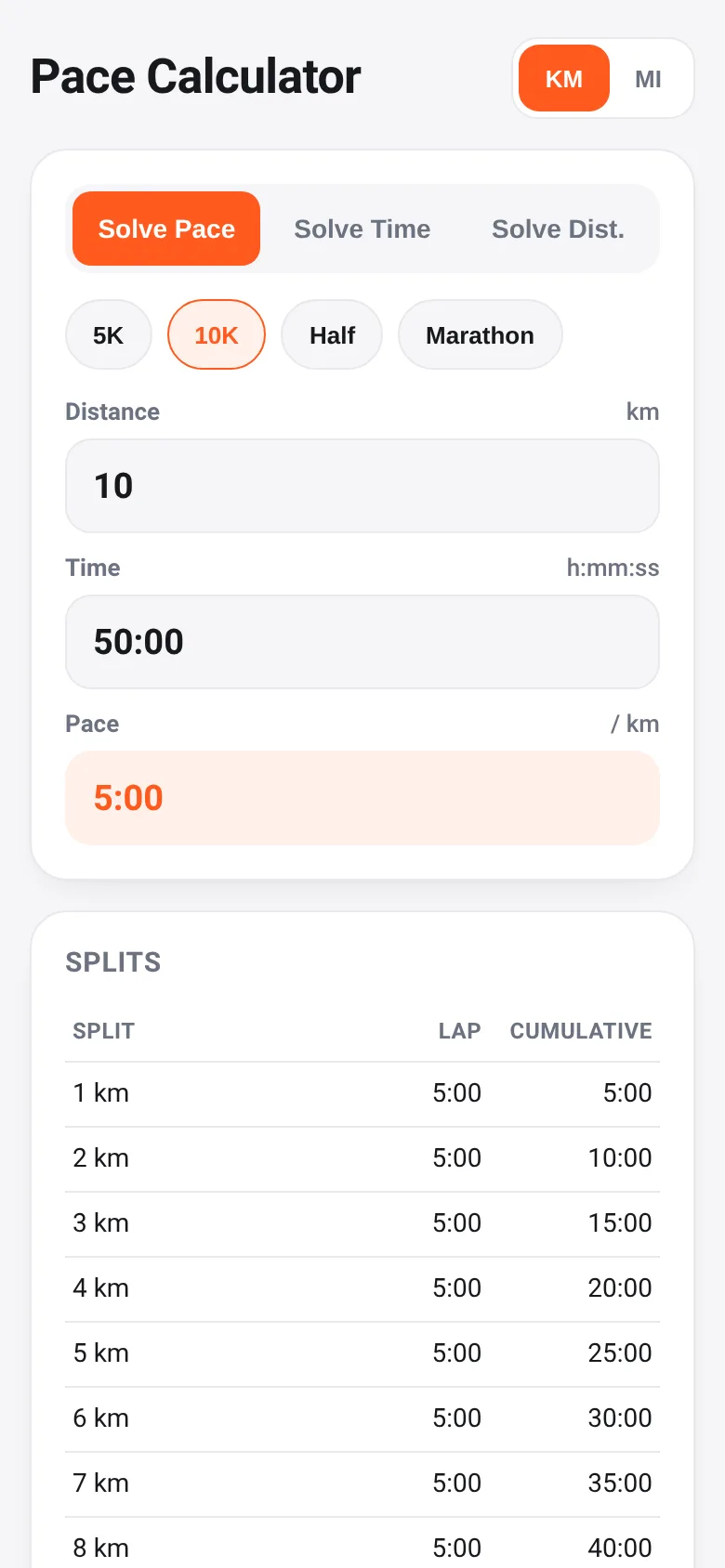
Runners need to know how fast they're going, how long a run will take, or how far they can go in a set time. Pace Calculator lets you enter any two of these three values—distance, time, or pace—and instantly computes the third. It shows you split times for every kilometer or mile, and uses the Riegel formula to predict what you could run at 5K, 10K, half marathon, or marathon distances based on your current effort.
What it does
Enter a distance and time (or pace and distance, or time and pace) in kilometers or miles, and the calculator fills in the missing value. A splits table shows your cumulative time at each unit interval. Below that, a predictions section forecasts your race times at the four standard distances. Tap any race preset button to instantly load that distance. Switch between kilometers and miles with one tap, and your numbers convert automatically. The app saves your last entries so they reappear when you return.
Key features
- Solve for any unknown Pick whether you want to calculate pace, time, or distance; enter the other two and get the result instantly.
- Split table See cumulative time at each kilometer or mile, plus time for any partial distance at the end.
- Race predictions The Riegel formula estimates your time at 5K, 10K, half marathon, and marathon based on your entered effort.
- Unit toggle Switch between kilometers and miles; all your numbers convert and stay consistent.
- Race presets Tap 5K, 10K, Half, or Marathon to instantly load those distances and see splits and predictions.
How to use it
- Choose whether you want to solve for pace, time, or distance by tapping the button at the top.
- Enter the distance and time (or the two values the mode asks for) using the input fields.
- Review the splits table to see your cumulative time at each unit, and check the predictions to see estimated times at standard race distances.
- Tap a race preset button to load a standard distance and recalculate instantly.
- Switch between kilometers and miles using the KM/MI toggle; your numbers will convert.
Who it’s for
Runners who want to plan workouts, understand their pace, or estimate race times. Works for anyone calculating speed, duration, or distance for running or other endurance activities.
The app’s share card (1200×630)
Questions and answers
How do I start?
Pick what you want to solve for (pace, time, or distance) at the top. Then enter the two values you know—for example, distance and time—and the calculator fills in the third. Your entries are saved automatically.
Can I see splits for my run?
Yes. Once you enter a distance and pace (or time), the splits table shows your cumulative time at each kilometer or mile, so you can plan splits for your workout or race.
How does the race prediction work?
It uses the Riegel formula, which estimates your time at other distances based on a known effort. Enter a distance and time you've run or plan to run, and it predicts what you could run at 5K, 10K, half marathon, and marathon.
Does it work in miles?
Yes. Tap the MI button to switch to miles, and all your numbers convert. Tap KM to go back to kilometers. Your data is saved in your choice of unit.
More health & fitness apps
- Icebreakers · Swipe through fun, deep, work, and family icebreaker questions and save your favorites for parties and teams.
- Pitch Timer · Write cue cards, pick a 30/60/90-second timer, and rehearse your pitch with haptics and per-card timing feedback.
- Sun Arc · See the sun's arc across the sky for any latitude and day, with sunrise, sunset, day length, and golden hour windows.
- Big Text · Flash giant text across a room in auto-fit or scrolling marquee mode, with color themes and a gentle blink for safety.
- Shot List · Plan video scenes with shot cards, durations, and location tags. Check off shots as you film to track progress.
- Tally Counter · Track multiple named counts with big tap targets, haptics feedback, and one-tap undo on reset.