Web app · Health & fitness
Load the right plates for your target weight
See exactly which plates go on each side of your barbell, plus an auto-generated warm-up ladder.
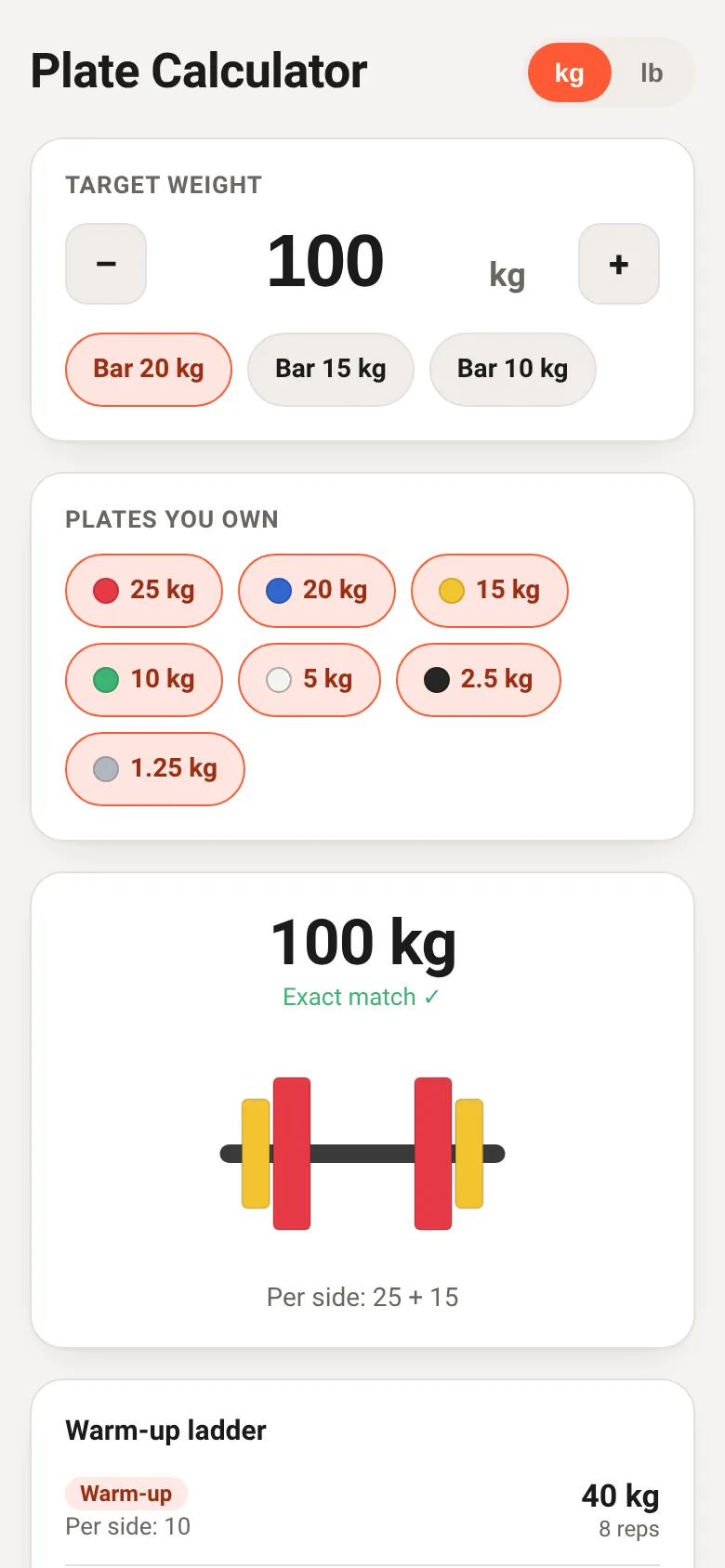
Setting up a barbell with the correct weight takes time and mental math. Plate Loader solves this by letting you enter a target weight and telling you exactly which plates to load per side. Choose your bar weight, select the plates you own, and the app displays a color-coded barbell diagram showing the correct loading, plus tells you if you hit the target exactly or how close you get.
What it does
You pick a unit (kilograms or pounds), choose your barbell weight, select which plate denominations you own, and enter a target weight. The app calculates the greedy solution—loading the heaviest plates first—and shows you a visual barbell with color-coded plates on each side. Below that, it lists the plates per side in a readable format. It also generates a warm-up ladder with six steps from 40% to 100% of your target, telling you the plate configuration for each step and how many reps to perform.
Key features
- Color-coded barbell diagram Plates are drawn to scale and colored by weight denomination, showing exactly what your loaded bar looks like.
- Unit toggle and bar selection Switch between kilograms and pounds; choose from multiple bar weights (kg: 20, 15, 10; lb: 45, 35, 15).
- Plate ownership Toggle which plates you actually own; the calculator only suggests plates from your inventory.
- Auto warm-up ladder See six ascending sets from 40% warm-up through your work set, with plate config and rep targets for each.
- Precision feedback Know instantly if you hit your target exactly or how many pounds/kilograms over or under you land.
- Session persistence Your selections, target weight, and plate inventory are saved to your browser.
How to use it
- Choose kilograms or pounds using the unit buttons at the top.
- Select your barbell weight from the chips in the first card.
- Click on plate weights to toggle which ones you own.
- Enter your target weight using the input field or the plus and minus buttons.
- Read the resulting barbell diagram and per-side plate list below.
- Check the warm-up ladder to see what to load for each warm-up set.
Who it’s for
Weightlifters and strength trainers who want to load the barbell quickly and correctly. Works for anyone with access to a web browser on a phone, tablet, or computer.
The app’s share card (1200×630)
Questions and answers
Does it save my selections?
Yes. Your barbell weight, target weight, and which plates you own are saved in your browser so you start where you left off next time.
What if I cannot load exactly my target?
The app shows you the closest weight it can make with your plates and tells you how many pounds or kilograms over or under the target you are.
Does it work on my phone?
Yes. The app is fully responsive and works on phones, tablets, and computers.
How do I use the warm-up ladder?
The ladder shows six sets from 40% of your target up to 100%. Load the plates listed for each step, do the recommended reps, then move to the next step.
More health & fitness apps
- Icebreakers · Swipe through fun, deep, work, and family icebreaker questions and save your favorites for parties and teams.
- Pitch Timer · Write cue cards, pick a 30/60/90-second timer, and rehearse your pitch with haptics and per-card timing feedback.
- Sun Arc · See the sun's arc across the sky for any latitude and day, with sunrise, sunset, day length, and golden hour windows.
- Big Text · Flash giant text across a room in auto-fit or scrolling marquee mode, with color themes and a gentle blink for safety.
- Shot List · Plan video scenes with shot cards, durations, and location tags. Check off shots as you film to track progress.
- Tally Counter · Track multiple named counts with big tap targets, haptics feedback, and one-tap undo on reset.