Mobile app · Music & audio
FM AM Radio: Retro Dial Live Radio Tuner
Swipe a vintage-style dial to tune FM and AM radio stations live, and bookmark favorites as quick-access presets.
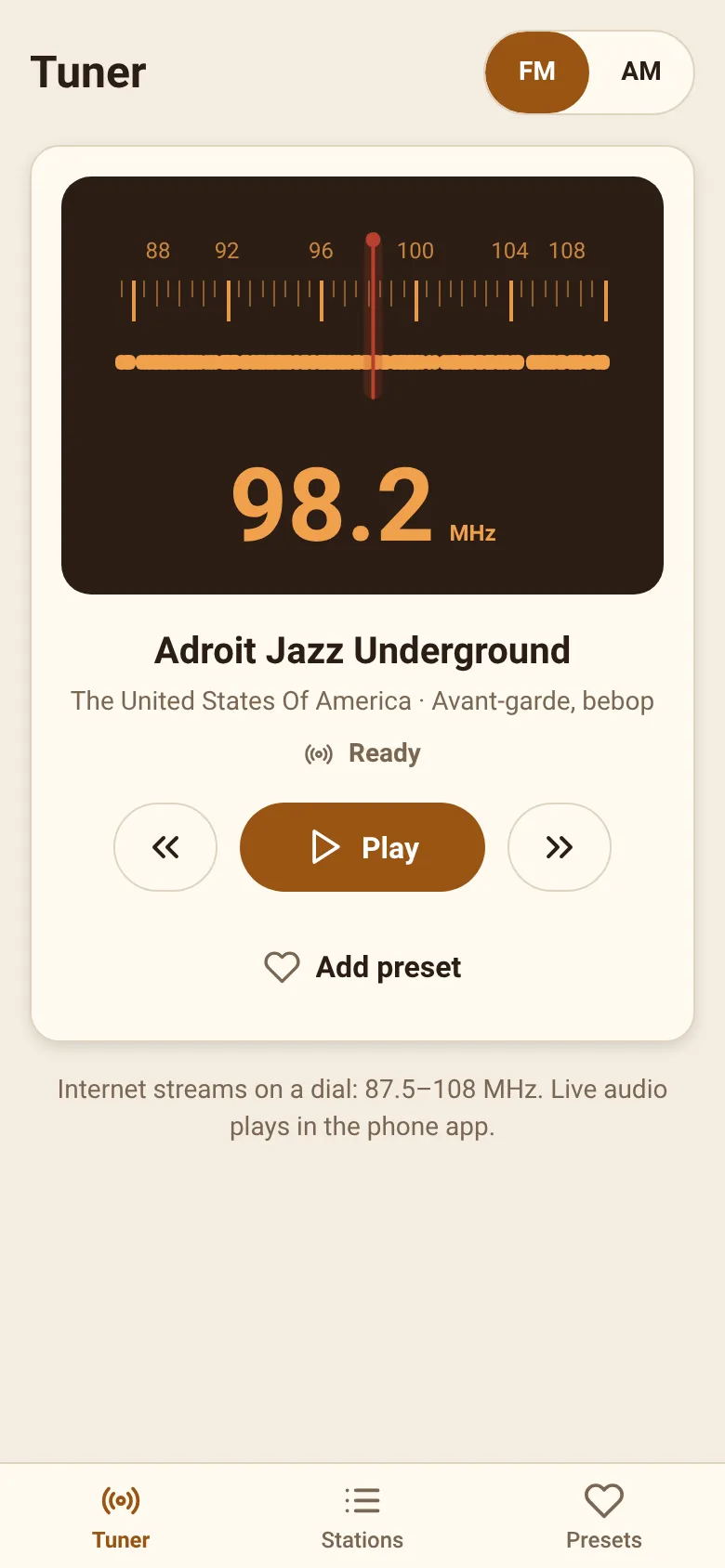
Finding and tuning radio stations on your phone should feel natural and satisfying. FM AM Radio brings back the tactile joy of turning a real radio dial. Swipe across the frequency spectrum to find live stations, watch haptic feedback tick as you pass station frequencies, and save your favorites as presets for instant access whenever you want them.
What it does
The app shows a horizontal dial with labeled frequency bands for FM (88–108 MHz) and AM (600–1600 kHz). Swipe the dial left and right to tune stations in real time. Small marks below the scale show where stations are located. The app fetches live station data and plays audio through your phone's speaker or headphones. Switch between the Tuner view, a Stations list, and your saved Presets using tabs at the bottom.
Key features
- Retro Dial Interface Swipe a smooth, animated dial with labeled frequency marks and haptic feedback as you pass over known station positions.
- Live Station Tuning Access a live database of FM and AM radio stations and play audio directly from any tuned frequency.
- Presets Tab Save your favorite stations as quick-access presets for one-tap tuning.
- Stations List Browse all available stations by name, frequency, and genre tags in an easy-to-scan list view.
- Mini Player A compact player bar shows the current station, playback status, and frequency while you browse other tabs.
- Accessibility Controls Use keyboard or voice commands to increment or decrement frequency; respects system motion-reduction settings.
How to use it
- Open the Tuner tab and swipe the dial left or right to change the frequency.
- Look for station marks on the dial; swipe slowly to tune into a station and tap play.
- Browse all stations in the Stations tab or save favorites to Presets by tapping the heart icon.
- Return to any preset instantly by opening the Presets tab and tapping a station name.
Who it’s for
Radio listeners who enjoy the tactile, visual experience of a real radio dial and want to explore and save live FM and AM stations on their phone.
The app’s share card (1200×630)
Questions and answers
How do I start listening to a station?
Swipe the dial to find a station, then tap the play button in the mini player or on screen. The app connects and begins playback.
How do I save a favorite station?
Once you tune to a station you like, tap the heart icon to save it as a preset. Presets appear in the Presets tab for quick access later.
Does the app work on all phones?
Yes, FM AM Radio runs on any smartphone with internet access to fetch station data and stream audio.
What if I can't hear audio?
Check that your phone's volume is up and audio is not muted. The mini player shows whether playback is active, loading, or has encountered an error.
Remix family
Remixes of this app
- Retro Radio · Edgar Durand Díaz
More music & audio apps
- Community Beat · साझा बीट बनाएँ: स्टेप दबाएँ, डीजे प्रीसेट चुनें, और सब मिलकर संगीत तैयार करें। वीडियो में एक्सपोर्ट करें।
- Community Beat · Tap drum steps on a shared 16-step beat that everyone editing it hears together. Load DJ presets, mute and solo tracks, export video or audio.
- Haunted Beat · A shared drum machine where everyone taps the grid together to build beats. Dancing pumpkins groove to the rhythm you create.
- Community Beat · Coloca casillas en pistas de batería y escucha el patrón que todos construyen juntos en tiempo real. Exporta tu sesión como video o audio.
- Chord Charts · Pick a root note and chord type to see a fretboard diagram with finger positions. Build common song progressions step by step.
- Icebreakers · Swipe through fun, deep, work, and family icebreaker questions and save your favorites for parties and teams.