Mobile app · Home & family
Plant Care: track and log your houseplant watering
Set custom watering intervals for each plant, see which ones need water today, and tap to record when you water them.
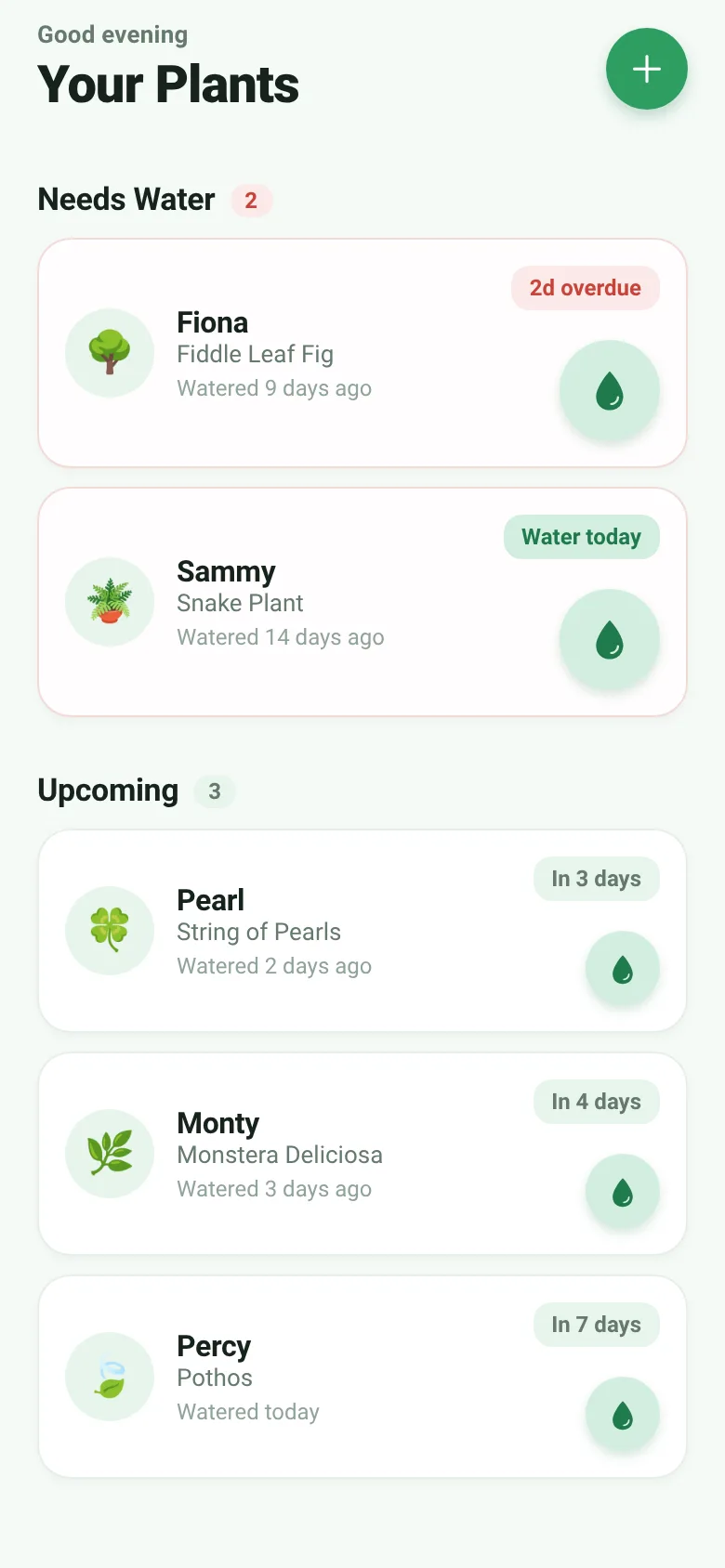
Keeping houseplants alive means remembering when each one was last watered and when it needs water next. Plant Care lets you add each plant with a name, type, and watering interval. The app then shows you which plants need water now, which are coming up soon, and when you last watered each one. You tap the water button on any plant to record that you just watered it, and the schedule updates instantly.
What it does
When you open the app, it greets you and displays your plants sorted by urgency. Plants that need water now appear at the top in a red section; plants due later appear below. Each plant shows its emoji icon, name, species, how long since it was last watered, and a button to tap when you water it. A modal lets you add new plants by naming them, picking a species emoji, and setting how many days between waterings. The app calculates and displays days until the next watering or how many days overdue each plant is.
Key features
- Urgency sorting Plants that need water now appear first; upcoming waterings follow below.
- Custom intervals Set how many days between waterings for each plant, from 1 to 60 days, with quick preset buttons.
- One-tap watering Press the water button to record that you just watered a plant and reset its schedule.
- Emoji plant types Choose from eight plant type emojis (Monstera, Cactus, Orchid, etc.) to identify each plant visually.
- Status displays See at a glance whether each plant needs water today, is watered already, or is overdue.
How to use it
- Tap the plus button to open the new plant form.
- Enter your plant's name and choose a species emoji.
- Set the watering interval using the stepper or preset buttons, then tap Add Plant.
- Tap the water droplet button on any plant to record that you watered it.
- Check the Needs Water section regularly to see which plants require attention.
Who it’s for
People who keep houseplants and want a simple way to track watering schedules without forgetting which plant needs water when.
What’s new in this version
A JavaScript error on line 459 has been fixed.
The app’s share card (1200×630)
Questions and answers
Does the app save my plants when I close it?
The code shows the app loads sample plants when you first open it, but does not show persistent storage; your plant list may not save between sessions.
Can I delete a plant I no longer have?
The app does not show a delete feature in the current code; you can add and water plants but cannot remove them.
Does it work on my phone?
Yes, the app runs on iOS and Android phones using React Native.
Will I get notifications to water my plants?
The app displays watering status and haptic feedback when you water a plant, but does not show push notifications in the code.
More home & family apps
- Pesca Tranquila · Juego de pesca sin apuros donde lanzás, recogés peces, completás tu álbum de especies y mejorás tu equipo.
- Icebreakers · Swipe through fun, deep, work, and family icebreaker questions and save your favorites for parties and teams.
- Pitch Timer · Write cue cards, pick a 30/60/90-second timer, and rehearse your pitch with haptics and per-card timing feedback.
- Sun Arc · See the sun's arc across the sky for any latitude and day, with sunrise, sunset, day length, and golden hour windows.
- Big Text · Flash giant text across a room in auto-fit or scrolling marquee mode, with color themes and a gentle blink for safety.
- Shot List · Plan video scenes with shot cards, durations, and location tags. Check off shots as you film to track progress.