Mobile app · Kids
Shape Sorter: drag bouncy shapes into their matching holes
A simple matching game for toddlers with tactile feedback and a fun celebration at the end of each round.
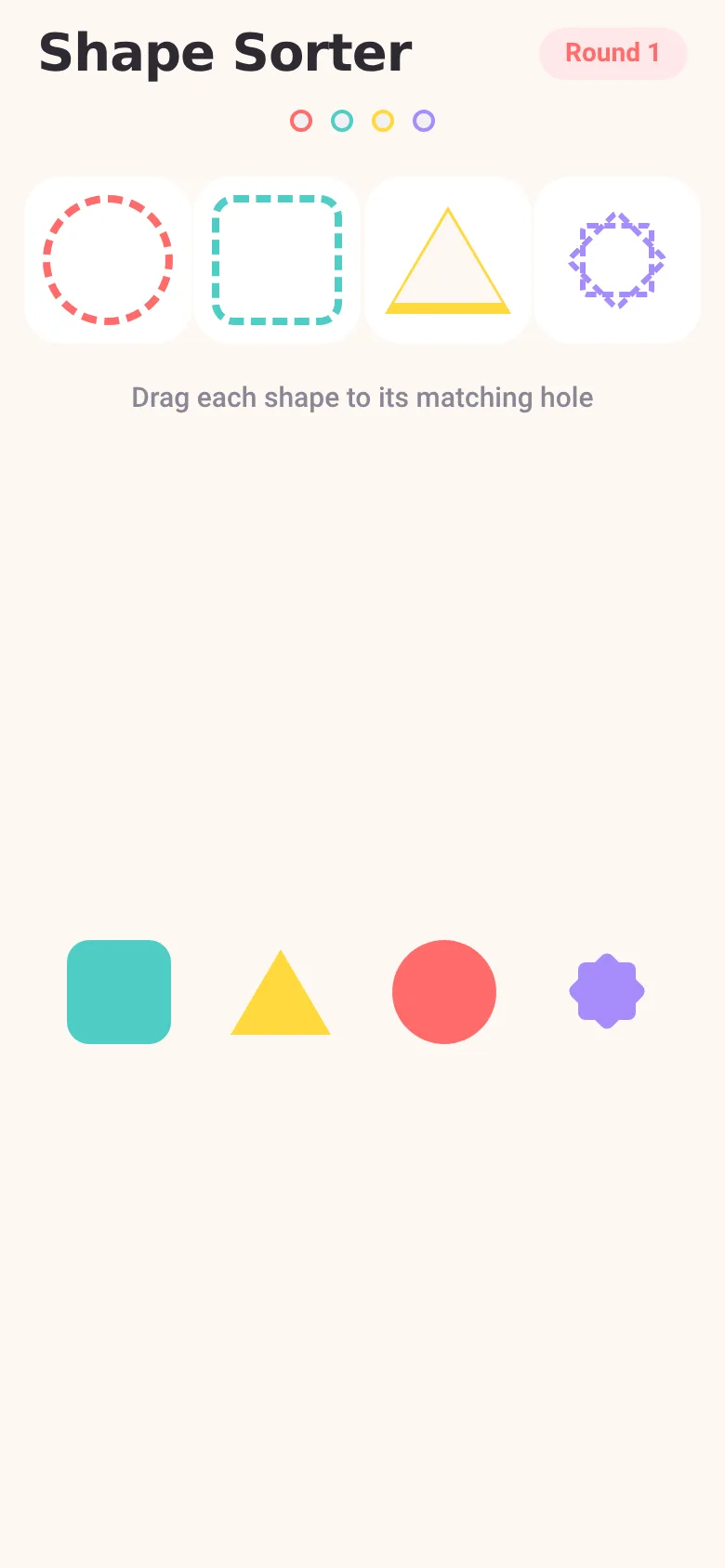
Toddlers learn by doing, and shape sorting builds hand-eye coordination and pattern recognition. Shape Sorter gives kids four colorful shapes to drag and match with holes—circles, squares, triangles, and stars. Each match triggers a little bounce and a vibration, and when all shapes are sorted, the app explodes with confetti and a cheerful celebration screen before starting a fresh round.
What it does
The app shows four dashed holes at the top, each shaped like a different shape. Below sit four colorful draggable shapes. You drag each shape and drop it near its matching hole; if it lands in the right place, it snaps in, bounces, vibrates, and fades away. A progress row of dots at the top fills in as you match. Once all four shapes are matched, confetti falls, an overlay appears with a celebration message and a Play Again button, and you start a new round with the shapes in a different order.
Key features
- Drag-and-drop matching Tap and drag each shape toward its matching hole; release to snap it in or bounce it back.
- Haptic feedback on match When a shape lands in the right hole, the phone vibrates to reward the action.
- Bouncy animations Shapes scale up when you grab them, spring into the hole, and shrink away on a match.
- Celebration screen When all shapes are sorted, confetti falls, a modal pops up with an emoji and message, and a button to play again.
- Round counter A pill in the top right shows which round you are on; it increments after each celebration.
- Progress dots Four dots at the top fill in with color as you match each shape, showing what remains.
How to use it
- Look at the four dashed holes at the top of the screen.
- Tap and drag one of the colorful shapes from the bottom area toward its matching hole.
- Release it near the hole; if it matches, it snaps in and disappears.
- Repeat for each of the four shapes until all are matched.
- When all shapes are sorted, tap Play Again on the celebration card to start the next round.
Who it’s for
Toddlers and preschoolers aged 18 months to 4 years, and parents or caregivers looking for a simple, tactile game to teach shape recognition and hand-eye coordination.
The app’s share card (1200×630)
Questions and answers
How do I start?
The game starts immediately when you open the app. Drag any shape toward its matching hole outline.
Does it save my progress?
Progress within a round is shown by the colored dots and filled holes. When you tap Play Again after a celebration, a new round starts fresh.
Will it work on my phone?
Yes, Shape Sorter runs on iOS and Android phones via the Expo framework.
What if I put a shape in the wrong hole?
If you drop a shape near the wrong hole, it bounces back to where it started and you can try again.
More kids apps
- Arena Fist 3D · Juego de pelea 3D con luchadores detallados. Juega en modo historia, 1 vs 1, 2 jugadores o entrena contra un muñeco.
- Arena Fist 3D · Juego de pelea 3D con modo historia, entrenamiento, 1-2 jugadores y modo Jefes con 150 niveles progresivos.
- Pesca Tranquila · Juego de pesca sin apuros donde lanzás, recogés peces, completás tu álbum de especies y mejorás tu equipo.
- Charades · Pick a category, flip words for 60 seconds, tap to score, and track team totals per round.
- ABC Explorer · Swipe through big letter cards with emoji words, then play a game to find matching letters. For children learning their ABCs.
- Baby Log · Track feeds, naps, and diapers with simple timers and today's totals at a glance. Quick taps, soft pastel design.