Mobile app · Kids
ABC Explorer
Swipe letter cards with emoji words, then play a find-the-letter game.
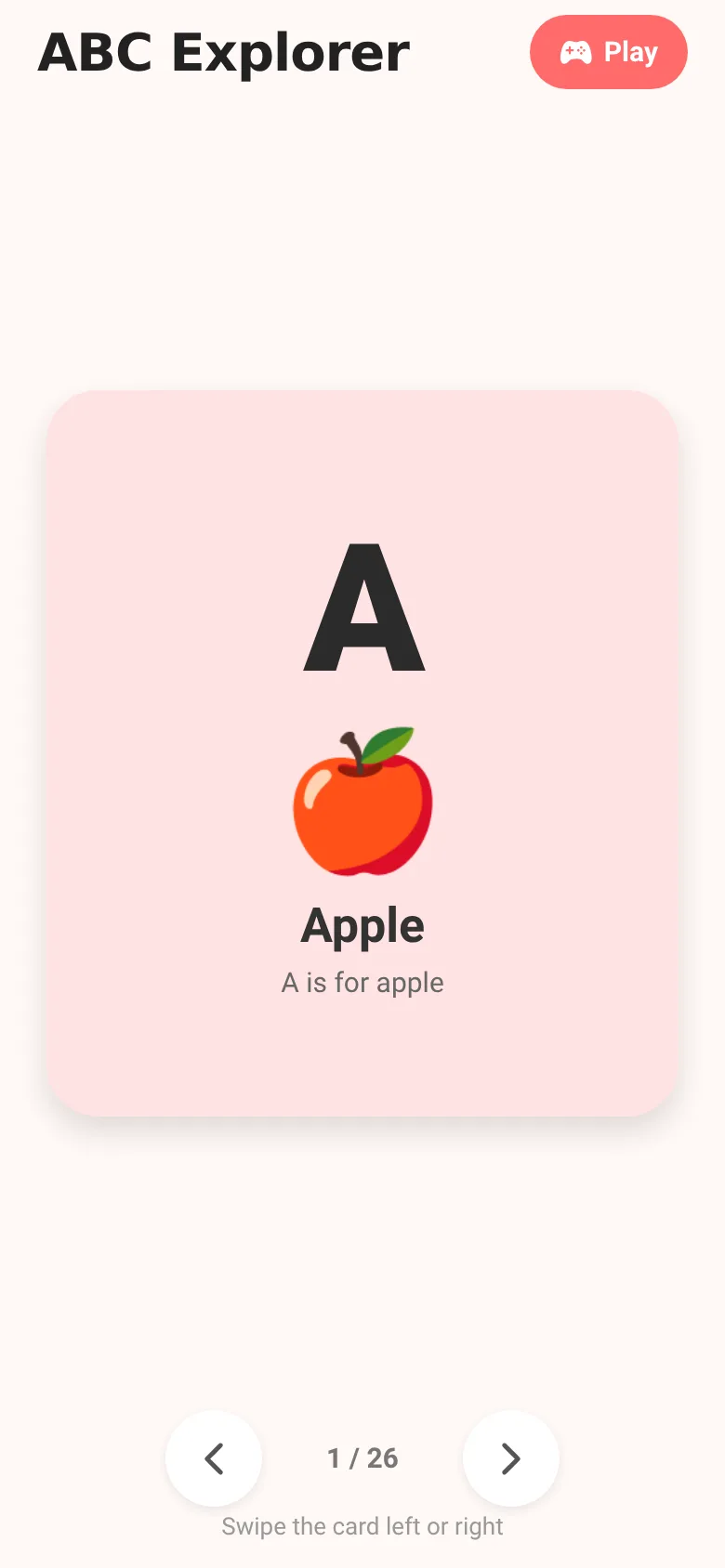
Young children learning to recognize letters need hands-on practice that feels like play. ABC Explorer gives them two ways to explore the alphabet: first, swipe through colorful cards showing each letter with a matching emoji and word to build letter-word connections. Then, play a game where they spot which letter matches a given emoji—reinforcing what they just learned. Haptic feedback and bounce animations make every interaction feel rewarding.
What it does
In explore mode, you swipe left or right through 26 letter cards. Each card shows a large letter, an emoji, and a word (A with an apple emoji, B with a balloon emoji, and so on). The cards bounce when they appear and rotate as you swipe them. When you want to practice, tap the Play button to enter the game: you see an emoji and word, then tap one of four letter buttons to match it. The app tells you if you're right or wrong and keeps a score. You can return to explore mode by tapping back.
Key features
- Swipeable letter cards Drag letter cards left or right to move through the alphabet, with bounce animation and rotation feedback.
- Letter-word pairing Each card shows a letter, emoji, and word to build connections—for example, A is for Apple with a 🍎 emoji.
- Find-the-letter game Tap a letter button to match it to an emoji and word shown on screen; the app gives instant feedback and tracks your score.
- Haptic and visual feedback Feel taps and hear success or error responses; animations shake when you pick wrong and flash green when you pick right.
- Quick navigation Use side buttons or swipe to move through the alphabet; the counter shows your position (3 / 26).
How to use it
- Open the app and view the letter card for A.
- Swipe the card left or right, or tap the arrow buttons, to browse through all 26 letters.
- Read the letter, emoji, and word on each card to build familiarity.
- Tap the Play button at the top to enter the game.
- Look at the emoji and word shown, then tap the letter button you think matches.
- Keep playing rounds and watch your score grow.
Who it’s for
Young children (ages 3–6) who are learning to recognize letters and their sounds; parents and teachers looking for a simple, playful alphabet tool.
The app’s share card (1200×630)
Questions and answers
Do I need to create an account or log in?
No. ABC Explorer is a standalone app; it opens and works immediately without sign-up.
Does the app save progress or scores?
The app shows your score during a play session, but progress is not saved between sessions.
Can I use this on a tablet or phone?
Yes. ABC Explorer runs on both phones and tablets running iOS or Android.
What happens if my child picks the wrong letter?
The app shakes gently, says 'Try again!' and lets them pick a different letter in the same round.
More kids apps
- Shape Sorter · A toddler game where kids drag colorful shapes into matching holes, with bouncy animations, haptics, and a celebration when all shapes are sorted.
- Baby Log · Track feeds, naps, and diapers with simple timers and today's totals at a glance. Quick taps, soft pastel design.
- Vocab Swipe · Swipe French vocabulary cards to master them. Tap to flip, swipe right to mark as known, left to review later, and watch your progress in real time.
- Interview Bank · Post and upvote real interview questions by role and type. Mark questions you were asked to build your prep list.
- Study Hours · Log study sessions by subject and minutes. See your group's weekly hours, leaderboard, and a heatmap of the busiest study days.
- Family Chores · Claim household chores for points, race the weekly leaderboard, and work together toward a family reward goal.