Web app · Learning
Fraction Pizza: Learn fractions with visual pizza slicing
Slice pizzas into parts, compare fractions side by side, add slices together, and test your skills with a quick quiz.
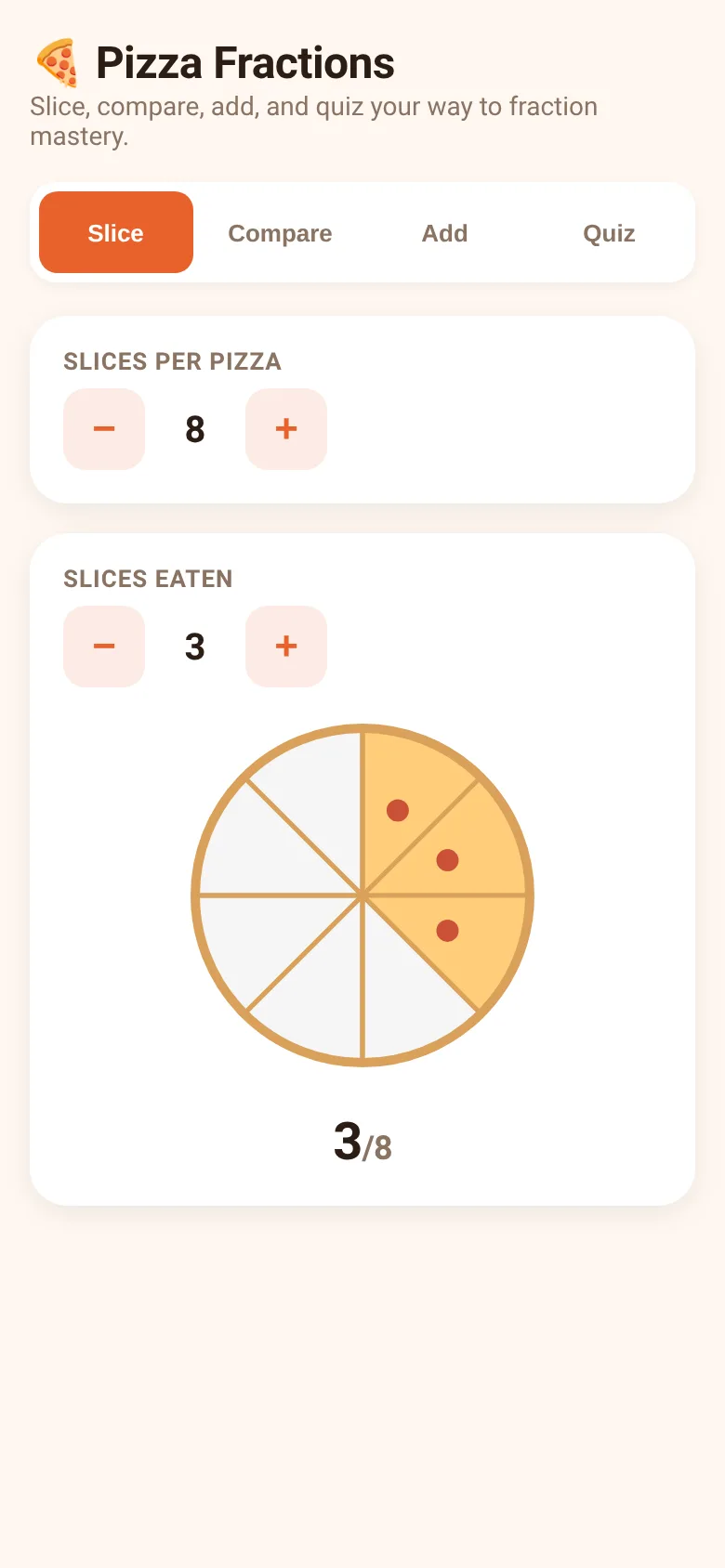
Understanding fractions can be tricky for kids. Fraction Pizza turns the abstract concept of parts and wholes into something concrete and delicious: pizza. You control how many slices a pizza has and how many are eaten, watch the fraction change on screen, compare two pizzas side by side to see which has more, add fractions together, and answer quiz questions with animated pizza visuals to reinforce what you learned.
What it does
The app has four hands-on sections. In Slice, you adjust how many total slices a pizza has and how many are eaten, seeing the fraction update in real time. In Compare, you set up two pizzas with different fractions to see which one is bigger. In Add, you combine slices from two pizzas that share the same denominator, watching the sum appear with pepperoni dots highlighting what you've chosen. In Quiz, you answer three questions: identify a fraction shown on a pizza, pick which of two fractions is larger, and solve an addition problem, with your score at the end.
Key features
- Interactive pizza slicing Use plus and minus buttons to change the number of slices and how many are eaten, seeing the fraction display and pizza diagram update instantly.
- Side-by-side comparison Set up two pizzas with different numerators and denominators to compare which fraction is larger, with a message showing the result.
- Fraction addition Add two fractions that have the same denominator by adjusting slices from each pizza and watching the sum calculate, including simplified forms or whole numbers.
- Interactive quiz Answer three randomized questions: identify fractions shown, compare two fractions, and add fractions, with a final score and encouraging message.
- Visual pizza diagrams Each slice is drawn as a wedge with pepperoni dots on the filled portions, making the fraction concept visual and recognizable.
- Smooth animations Pizza diagrams bounce and refresh smoothly when you adjust values, keeping the interface responsive and engaging.
How to use it
- Open the app in your web browser.
- Click the Slice tab and use the plus and minus buttons to see how fractions change as you adjust numerator and denominator.
- Try the Compare tab to see which of two pizzas has a bigger fraction.
- Use the Add tab to combine fractions from two pizzas with the same denominator.
- Click the Quiz tab and answer three questions about fractions to earn a score.
Who it’s for
Kids ages 6 to 10 learning fractions, and teachers or parents looking for a hands-on, visual way to introduce fraction concepts without formal math notation overwhelming the lesson.
The app’s share card (1200×630)
Questions and answers
Do I need to sign up or log in?
No. The app runs entirely in your browser with no account needed.
Does the app save my progress?
Quiz scores appear at the end of each attempt, but there is no permanent save or profile. You can restart the quiz at any time.
Can I use this on a phone or tablet?
Yes. The app is responsive and works on any device with a web browser.
What if my answer is wrong in the quiz?
After you answer all three questions, you see your final score. You can tap Try Again to restart with three new random questions.
More learning apps
- Shape Sorter · A toddler game where kids drag colorful shapes into matching holes, with bouncy animations, haptics, and a celebration when all shapes are sorted.
- ABC Explorer · Swipe through big letter cards with emoji words, then play a game to find matching letters. For children learning their ABCs.
- Baby Log · Track feeds, naps, and diapers with simple timers and today's totals at a glance. Quick taps, soft pastel design.
- Vocab Swipe · Swipe French vocabulary cards to master them. Tap to flip, swipe right to mark as known, left to review later, and watch your progress in real time.
- Interview Bank · Post and upvote real interview questions by role and type. Mark questions you were asked to build your prep list.
- Study Hours · Log study sessions by subject and minutes. See your group's weekly hours, leaderboard, and a heatmap of the busiest study days.