Web app · Learning
Tell Time: Drag and learn to read analog clocks
Set the clock hands to match the time shown, get friendly feedback, and watch your solved count grow.
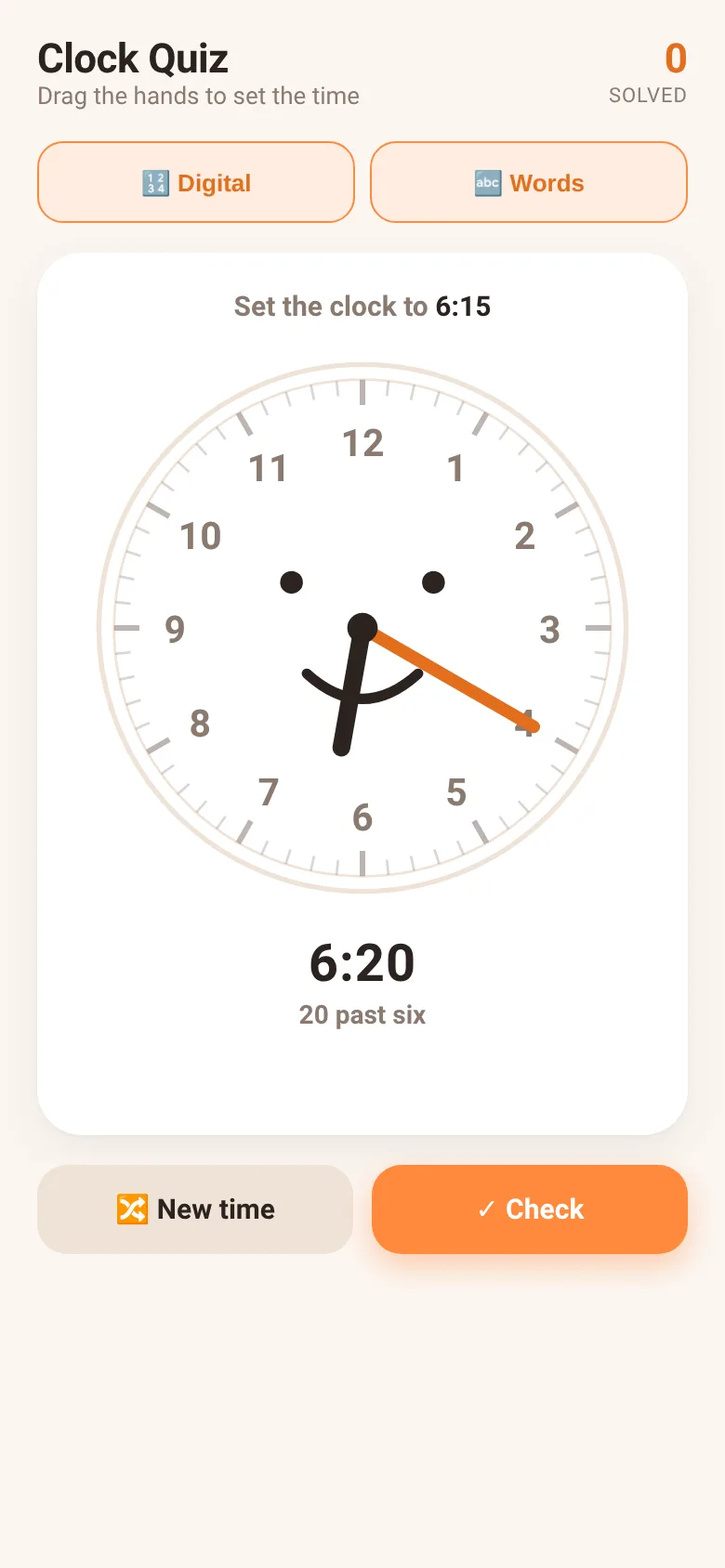
Many children find analog clocks confusing. Tell Time lets you practice by dragging the hour and minute hands to match a target time. Each attempt gives you instant, friendly feedback: if you get it right, the smiling clock celebrates; if you miss, a hint tells you which hand needs adjustment. Your solved count persists so you can track your progress.
What it does
A large interactive clock face displays a target time in text (like "3:45"). You drag the hour hand (shorter, darker) and minute hand (longer, lighter) to set the clock to that time. As you drag, you see the time update in digital form (3:45) and in words (a quarter to four). Tap Check to submit your answer; correct answers trigger praise and a new round, while incorrect ones give a specific hint about which hand needs fixing.
Key features
- Draggable hands Tap and drag either hand to rotate it; the clock updates in real time.
- Digital and words toggle Show or hide the digital display (3:45) and word display (a quarter to four) independently.
- Friendly feedback A smiling clock face celebrates correct answers; a sad face and specific hint guide you when you miss.
- Score tracking Your solved count is saved in the browser and displayed at the top.
- Varied times Each round picks a random time in 5-minute intervals from 1:00 to 12:55.
How to use it
- Look at the target time shown at the top of the card.
- Drag the hour hand (short, dark) and minute hand (long, light) to match that time.
- Watch the digital and word readouts update as you drag.
- Tap the Check button to see if you got it right.
- If correct, the clock smiles and a new time appears; if not, a hint tells you which hand to fix.
Who it’s for
Children learning to read analog clocks, and anyone who wants to practice or refresh this skill. Works on any touch or mouse device.
The app’s share card (1200×630)
Questions and answers
How do I drag the hands?
Tap the end of either hand (or the invisible circle around it) and drag it to the correct position. Release to drop it.
Does it save my progress?
Yes. Your solved count is saved in your browser, and your preference for showing or hiding the digital and word displays is also saved.
Can I turn off the digital time or word display?
Yes. Click the Digital or Words button at the top to toggle each one on or off.
What if I get the time wrong?
The clock shows a sad face and gives you a hint about which hand to adjust. Try again without losing your score.
More learning apps
- Shape Sorter · A toddler game where kids drag colorful shapes into matching holes, with bouncy animations, haptics, and a celebration when all shapes are sorted.
- ABC Explorer · Swipe through big letter cards with emoji words, then play a game to find matching letters. For children learning their ABCs.
- Baby Log · Track feeds, naps, and diapers with simple timers and today's totals at a glance. Quick taps, soft pastel design.
- Vocab Swipe · Swipe French vocabulary cards to master them. Tap to flip, swipe right to mark as known, left to review later, and watch your progress in real time.
- Interview Bank · Post and upvote real interview questions by role and type. Mark questions you were asked to build your prep list.
- Study Hours · Log study sessions by subject and minutes. See your group's weekly hours, leaderboard, and a heatmap of the busiest study days.