Azure DevOps Work Item to AI Coding Agent
Turn an Azure DevOps work item into an AI coding agent session with the context, approvals, checks, and traceability needed for production delivery now.
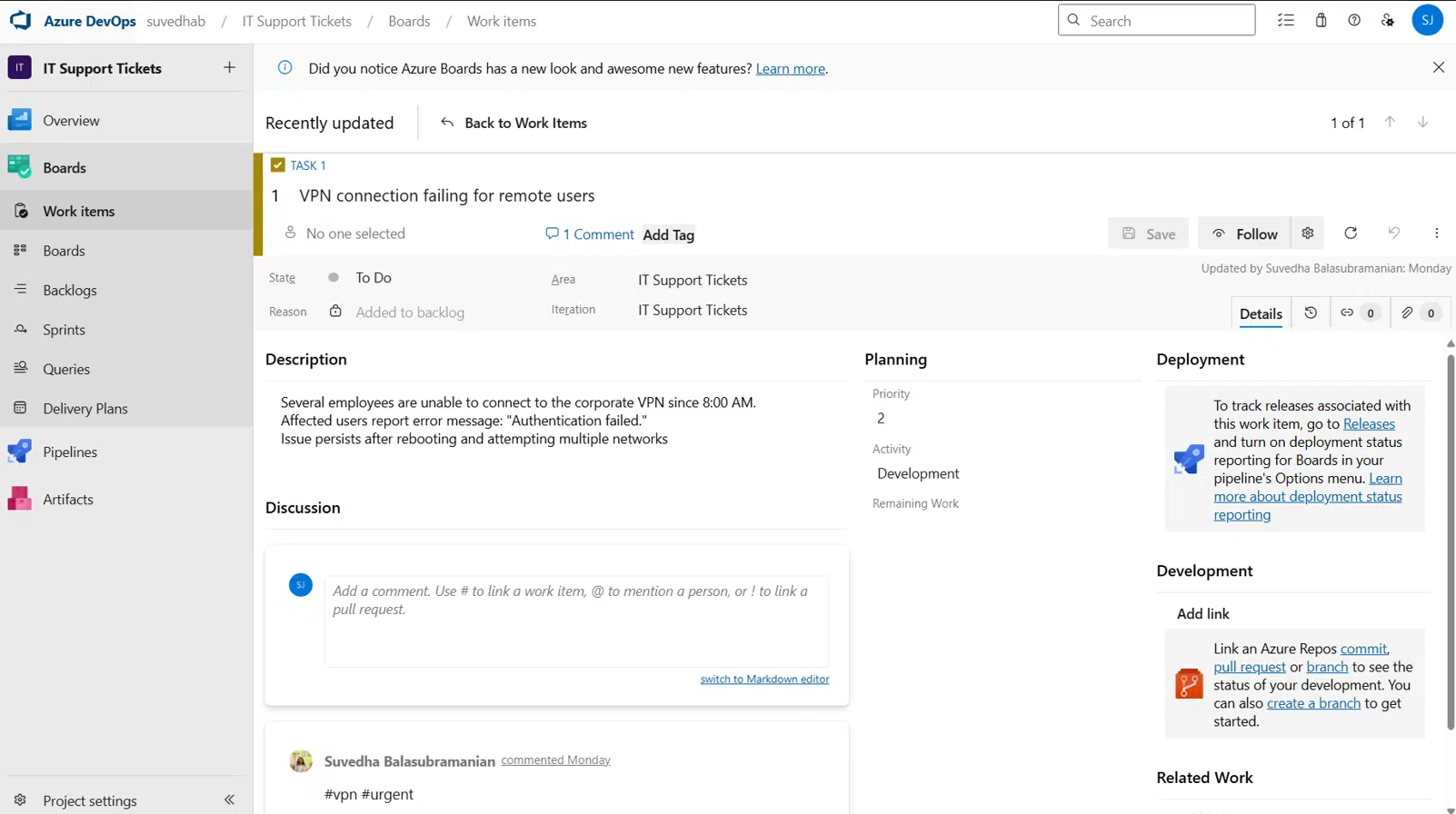
A work item is already a contract: the user problem, acceptance criteria, priority, and often the discussion that explains why the change matters. The gap appears when an engineer copies that contract into an AI prompt, hunts for the right repository, and reconstructs context the team already captured. An Azure DevOps work item to AI coding agent workflow should remove that gap without removing human control.
The goal is not to send every ticket straight to a model and hope for a pull request. The goal is to turn a defined unit of planned work into a visible, supervised execution session. The agent gets the right codebase, branch rules, related evidence, and completion criteria. The developer gets a live view of what changed, what failed, and what needs a decision.
Why Azure DevOps work items are better than raw prompts
A raw prompt usually starts too late. By the time someone types, “Fix the checkout validation bug,” they have already made several decisions off-screen: which repository contains the service, which component owns validation, whether the issue is reproducible, and what behavior counts as fixed.
Azure DevOps often holds that information in plain sight. A bug such as BUG-1842 may include a customer impact statement, repro steps, acceptance criteria, tags, sprint assignment, linked pull requests, and attachments. It may also link to an incident, a design task, or a parent feature. That is useful execution context, not ticket decoration.
An effective handoff extracts the details that change the agent’s behavior. Title and description establish intent. Acceptance criteria define the finish line. Tags can indicate domain ownership or risk. Linked work items expose dependencies. Comments may contain the one constraint that prevents a costly wrong implementation: “Keep the existing API response shape” or “Do not modify the shared billing library.”
The work item is still not enough on its own. Tickets can be stale, incomplete, or written for planning rather than implementation. That is why the workflow needs checkpoints. An AI agent should be able to investigate and propose, but it should not silently convert ambiguity into production code.
From work item to supervised agent session
The useful model is a closed loop. Azure DevOps provides the planned work. The system resolves technical context. The agent performs bounded work. A developer reviews actual evidence. The result flows back to the work item.
1. Resolve the repository before the agent starts
The first decision is repository selection. This seems obvious until an organization has a web app, API, shared package, infrastructure repository, and mobile client with similar naming. Sending an agent to the wrong repository creates clean-looking but irrelevant output.
Repository resolution should use explicit mappings where possible: area path, team, component tag, project, or work item type. It can also use linked pull requests, prior commits, and service ownership metadata. For example, a work item in Commerce\Checkout, tagged payments-api, should route to commerce-api, not to the storefront repository simply because the title says “checkout.”
If confidence is low, stop for a human selection. This is a good trade-off. A one-tap repository choice is faster than reviewing a 400-line diff in the wrong codebase.
2. Build an execution brief, not a ticket dump
Agents work better with structured context than with a wall of copied text. The execution brief should state the task, expected behavior, non-goals, relevant files or services, linked evidence, and verification requirements.
Consider a work item that says: “Prevent duplicate subscription creation when a customer retries checkout.” A useful brief adds the acceptance criteria, the relevant API endpoint, the existing idempotency mechanism, the linked Sentry issue, and the command required to run the payment test suite. It also makes the boundary explicit: preserve current retry semantics and do not change the provider integration contract.
That brief gives the agent room to inspect the repository while keeping the work anchored. It also makes the session understandable to the next person who opens it. Nothing needs to be re-explained after a handoff.
3. Choose the right agent job
Not every work item should trigger the same action. A small, well-scoped bug may be appropriate for implementation. An unclear production issue may need investigation first. A feature with a Figma attachment may need a plan before code. A documentation task may need repository analysis and a targeted update.
This distinction matters because agent output should match the state of certainty in the ticket. If acceptance criteria are incomplete, ask the agent to identify affected components, trace the current behavior, and return a proposed approach. Do not ask for a final patch first.
For implementation work, set practical constraints: create a branch, inspect existing patterns, make minimal changes, run specified checks, and report any assumptions. The agent should know whether it can open a pull request or whether a human must approve the diff before that step.
Keep control while the agent is working
Long-running coding tasks do not fail only because the model writes bad code. They fail because the developer loses visibility. A terminal session closes. A laptop goes to sleep. A question appears while the owner is away. The work stalls, or worse, continues based on an unreviewed assumption.
A control layer changes that operating model. It exposes the agent’s current phase: repository scan, implementation, test run, blocked state, or pull request preparation. It preserves the prompt history, commands, files changed, test output, and decisions made along the way.
That record gives a reviewer something better than a final summary. They can see that the agent found an existing idempotency key helper, modified CreateSubscriptionHandler, added a regression test, and hit a failing integration check caused by a missing local secret. Those are actionable facts.
CodeAgent Mobile is designed for this kind of continuity. A developer can approve a proposed diff, redirect the prompt, request a narrower change, or stop the session from a phone without losing the work item context or execution history.
Approve decisions, not just code
Human oversight is most effective at the decision points with the highest leverage. The first is scope: is the agent solving the actual work item? The second is architecture: did it choose the right boundary? The third is the final diff: does the code preserve existing conventions and contracts?
This does not require interrupting every command. Let the agent read files, search the repository, and run safe local checks autonomously. Require approval when it proposes a broad refactor, changes a public interface, modifies infrastructure, accesses sensitive environments, or prepares a mergeable pull request.
The right policy depends on repository risk. A low-risk internal tool can allow more autonomous execution than a payments service or regulated application. The common requirement is traceability: every meaningful action should connect back to a work item, a branch, a diff, and a reviewer decision.
Make verification part of the task contract
“Code completed” is not a delivery state. A work item becomes credible only when the implementation, checks, review status, and ticket state agree.
The agent should run the checks that fit the change. For a TypeScript API, that could mean formatting, type checking, unit tests, and a focused integration test. For a UI task, it may include the build, component tests, and visual review against the linked design. If a check cannot run, the session should say why rather than implying success.
The pull request is the natural proof boundary. A useful PR description references the Azure DevOps work item, explains the behavior change, lists validation performed, and calls out limitations or follow-up work. Reviewers should see the same acceptance criteria that guided the agent, not a generic generated summary.
After review and merge, update the work item with the branch, PR number, check status, and final disposition. If the agent discovered that the ticket needs product clarification, return it with a concise evidence trail instead of marking it done. Closed-loop delivery includes honest non-completion.
Where this workflow needs restraint
Automation is not a substitute for ticket quality. A vague item such as “Improve onboarding” cannot become a precise implementation simply because an agent can inspect the codebase. It may generate a plausible change, but plausibility is not alignment.
Likewise, linked context can contain noise. Old comments, abandoned design files, and unrelated incident threads should not all become instructions. Prefer current acceptance criteria and explicitly designated references. Give the agent enough context to act, then verify its assumptions against the repository and the team’s current priorities.
The best Azure DevOps work item to AI coding agent workflow does not make developers passive. It makes them available at the moments where judgment matters. Start with a bounded bug, require a real diff and real checks, and keep the full path from ticket to merge visible. That is how agent speed becomes engineering throughput instead of another queue to supervise.