Android


01 · Work item
DEV-5895In progress
Add referral reward toast to the invite screen
Toast fires on reward earned
Copy matches design
14-day grant reflected
Acceptance criteria become a checklist the agent works against.
$ codeam → workflow continuityApprove, redirect, and keep your AI coding agents moving from your phone — while you’re away from the desk. Works with the agent you already run: Claude Code, Cursor, Copilot, Codex, Gemini & more.
Runs wherever your code lives — local, a cloud Codespace, or your own server. Nothing to set up: pair once and you’re supervising in under a minute.
Free forever for 5 agent tasks a day. Upgrade only when your workflow can't afford to stop.
Two minutes: an agent working on its own, with you approving and redirecting from anywhere — nothing running on your laptop.
Pair once. From that point your agent’s session lives across every device you sign in on.
QR-scan from the mobile app into your IDE plugin or CLI. The agent your editor already runs becomes the agent your phone supervises.
The agent keeps running on your machine; chunks stream live to your phone. Approve, redirect, or end a turn from anywhere.
Walk away from the desk, pick the session back up on a laptop, hand it to a teammate. The thread keeps its history across every surface.
Pick a Jira, Linear, or Azure DevOps ticket. CodeAgent detects the repo, pulls in the right tools, packs the context, and launches an agent-ready session — no copy-pasting, no re-explaining.
Add referral reward toast to the invite screen
Acceptance criteria become a checklist the agent works against.
CodeAgent remembers which board maps to which repo, so future tickets skip manual repo selection.
CodeAgent reads ticket links and adds the right tools automatically.

Claude Code
online · context packed
Launches with the title, description, checklist, and linked tools already loaded. Intent set to Implement.
It closes the loop.
From the backlog to the merged PR and back — the work item you started from is the work item that gets updated. Nothing falls out of the tracker.
Pick a Slack thread. CodeAgent summarizes it, opens a ticket in your tracker — assigned, scored, with a description and acceptance criteria — detects the repo, packs the context, and launches an agent-ready session. Nothing gets lost between “we should fix this” and a merged PR.
Checkout throws a 500 when the promo code is expired — three users hit it today.
Repro’d it. We should validate the code before applying the discount.
CodeAgent reads the thread and summarizes the decision — no one has to write it up.
Validate promo code before applying checkout discount
A real ticket in your tracker — assigned, scored, with description and acceptance criteria.
CodeAgent maps the conversation to the repo it belongs to — and remembers it, so the next thread from this channel skips the picker.
Claude Code
online · context packed
Launches with the thread summary, the new ticket’s description and acceptance criteria, and the repo already loaded — nothing to re-explain.
It closes the loop — on both sides.
The chat that raised it hears back, and the ticket it created gets closed. When the work lands, CodeAgent comments the PR on the ticket and replies in the original Slack thread — so nothing falls out of the tracker or the conversation.
CodeAgent · comment
Opened PR #482 — validate promo code before discount. All acceptance criteria met.
CodeAgent APP
Fixed in PR #482, tracked as DEV-6001. Ready for review 👀
Connect a tool once and every session you start can use it — the tracker, the error, the spec, the thread. Your agent stops guessing at the context you already have.
The agent reads the issue, its acceptance criteria and the linked thread, then comments the result back where the work was tracked.
Hand it the actual error and the session it came from instead of a screenshot and a guess.
A decision in Slack becomes a tracked ticket and a running session, and the reply lands back in the same conversation.
26 connectors live across 11 categories — trackers, version control, chat, observability, docs, design, infrastructure and more. Connected from your dashboard, revoked there too.
See the GitHub PRs you're asked to review and the ones you opened. Read each changed file as a full diff in the built-in editor before you act, then approve, request changes, comment, merge, or close from your phone — resolve a conflicted PR by handing it to an agent, or send your own coding agent to review a PR and post its inline comments and verdict back to GitHub.
Validate promo codes before applying discount
Add rate limit to /commands/pending
Add referral reward toast to invite screen
Prerender description for PR command center
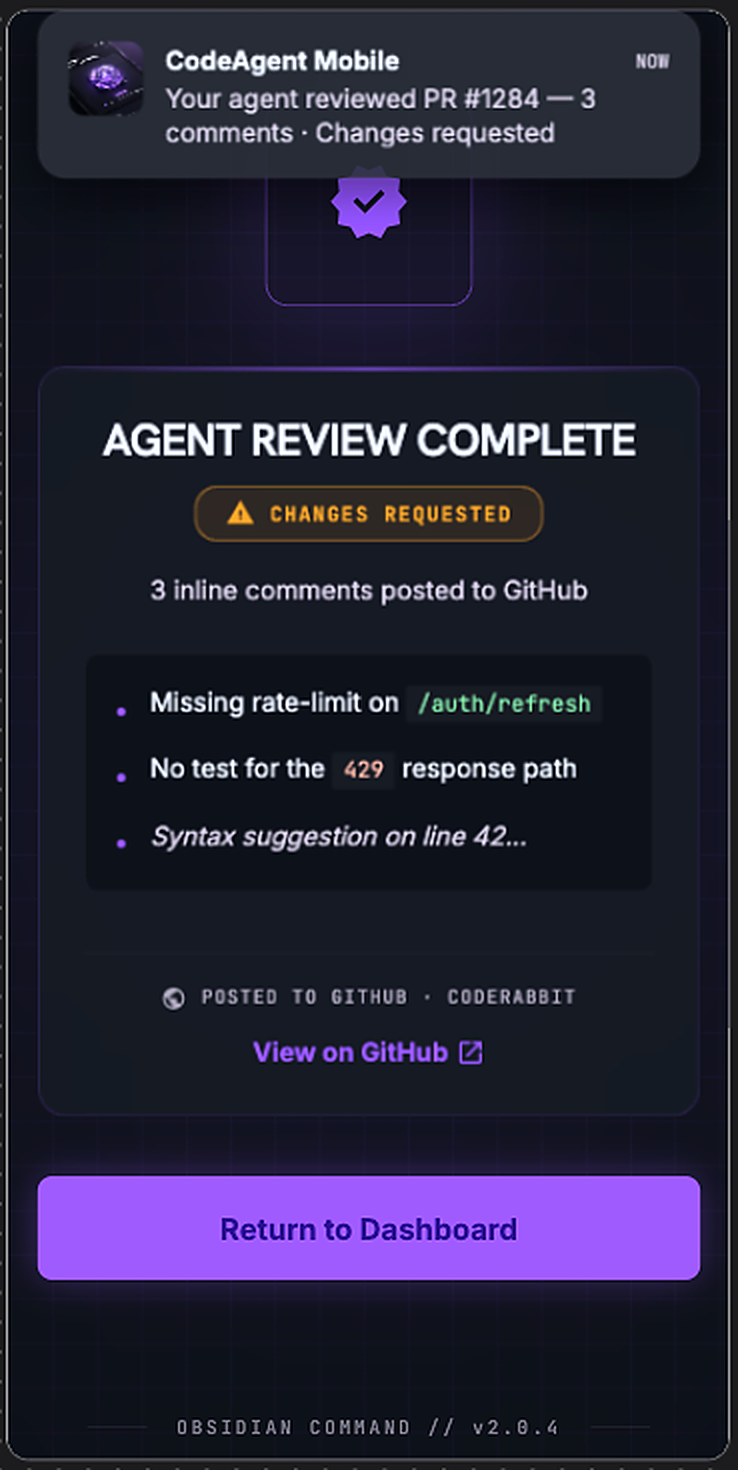
Pick an agent from your squad and point it at a pull request. It checks out the branch, reviews the changes, leaves inline comments where it finds issues, and approves or requests changes — posted straight to GitHub. You get a push notification the moment it's done.
Reviewed #1284
posted to GitHub
The last step comes off the desk too.
You start a session from a ticket, the agent ships a PR — and now the review and the merge happen from your phone. The whole loop, from backlog to shipped, keeps moving whether or not you're at a keyboard.
Run a pipeline of specialized agents on your repo — spec, code, review, verify — and supervise the whole assembly line from your phone.
Specifier
Turns your task into testable acceptance criteria
Coder
Implements them test-first
Reviewer
Fresh-eyes review — it never sees the coder’s chat
QA
Verifies every criterion and writes the report
Each stage ends with a real commit, the diff, and your project’s checks — run for real, green or red.
Each specialist works in a clean context. The reviewer judges the code, not the coder’s reasoning.
Handoffs are verified against your repo: the commit, the diff, and your checks’ actual output.
Watch stages advance live, pause, retry a stage, or step in when a specialist asks. From anywhere.
Quick Pack (Coder → Reviewer) is free · the Full Pack pipeline is Pro. Works with Claude Code, Codex, Gemini, Cursor and more.
Claude Code, Codex, Cursor, Gemini — the agents you already subscribe to stop being separate tools. In one session you decide who takes the next message, and you supervise the whole squad from your phone.
Type @ and the next message goes to another agent in your squad — no new session, nothing to re-explain. Free for everyone.
Each agent picks up its own memory of the work and gets caught up on what the others did while it was away. Every reply is labelled with who wrote it.
Working on something outside its strengths, the agent offers to hand it over — with a prompt you can edit. You confirm every handoff, one at a time. (Pro)
Turn-based by design: one agent works at a time, and nothing changes hands without you. Squad members today are Claude Code, Codex, Cursor, Gemini CLI, Kimi and opencode.
One button in the composer: speak or attach a screenshot and CodeAgent turns it into a clear, ready-to-run prompt in your own language — or switch to Talk to supervise your agent hands-free: ask it to review, approve, or merge a PR, catch you up on what it just did, dispatch a new task, or spin up a Codespace, all by voice. No typing on a phone keyboard, no losing your train of thought.
Speak a rough thought, or attach a screenshot or file — Compose structures it into a clean Task / Context / Steps prompt before it reaches your agent.
"the login button is too small on the invite screen, make it bigger and match the other screens"
TASK: Resize the invite-screen login button
CONTEXT: Other screens use the standard 48px button height
STEPS: Match padding/height, verify against the other screens
Supervise your coding agent hands-free: ask it to review, approve, or merge a pull request, catch you up on what it just did or is working on, send it a new task, or spin up / wake / stop a Codespace — it works and narrates progress back to you, no typing.
"Review PR 1284 and merge it if it looks good"
"Reviewed it — two small nits, tests pass. Merging now."
The old mic and Smart Compose buttons merge into one: Voice when the input is empty, Send once you start typing.
Compose mirrors the language you speak or type in — no forced translation before it reaches your agent.
Add a screenshot or file alongside your voice and Compose folds it straight into the prompt's context.
Ask your agent by voice to review, approve, or merge a pull request, catch you up on what it just did, send it a new task, or spin up / wake / stop a Codespace — it works and narrates progress back.
Compose is free (daily cap included). Talk is live for PRO, with 300 minutes of voice included each month.
Tap "New Codespace" in the app, pick a repo, and a fresh GitHub Codespace is provisioned, your agent is installed and authenticated, and your phone is paired — all without ever opening a laptop. Prefer the terminal? codeam deploy still works the same. Want it on your own server instead? Pick that target and run it on your hardware — same one-tap pairing.
Watch the real thing
Tap New Codespace, pick a repo, and a fresh GitHub Codespace boots with your agent installed and authenticated — no laptop, no terminal.
Zero setup either way. Everything configures itself — nothing to install or authenticate by hand. Your phone stays the remote; where the agent runs is up to you: a managed cloud workspace, or your own server — both supervised from the same app.
codeam auto-provisions a fresh GitHub Codespace, installs and authenticates your agent, and pairs your phone in ~60 seconds — zero config. Nothing to maintain — pause it and compute hours stop.
Paste one command on your own box — codeam takes it from there, auto-provisioning the runtime and agent over an outbound connection (no inbound ports, no tunnel, no SSH keys handed over). Then deploy repos to it from your phone, as many as you want — zero config.
The agent runs on a Codespace, supervised by PM2. You can close your Mac, fly to another timezone, switch networks — the session stays paired to your phone.
Launch from the mobile app in three taps, or run codeam deploy from any terminal. Both paths provision the workspace, install your agent — Claude, Codex, Gemini, whichever you've linked — and pair your phone in ~60 seconds.
Tap "Stop session" in the app or run codeam deploy stop — the codespace pauses, compute hours stop. Resume with one command later, your branch and files exactly where you left them.
On cloud and self-hosted sessions, CodeAgent Mobile automatically trims wasted context so your long, autonomous runs burn fewer tokens — lower cost, no extra setup. Powered by the open-source Headroom compressor.
Your agent already does the writing. CodeAgent gives you the supervision layer on top — approvals, redirects, course-corrections, and team handoffs that follow you across devices instead of pinning you to one screen.
Kick off a long refactor from your desktop. Step into a meeting. Approve the diff from your phone. Resume on your laptop. The session never breaks.
Real engineers among the 700+ developers running CodeAgent Mobile in their day-to-day workflow.
As a QA Engineer, I often have to wait for investigations or fixes before I can continue testing. CodeAgent Mobile lets me follow the progress, answer questions, and get notified when something needs my attention — all from my phone. It keeps my QA workflow moving even when I’m away from my laptop.
 Suleidis Leyva RamírezQA Engineer
It’s insane. AI already boosted our productivity, but this app takes it to the next level. While I’m using it I get more time for other things — my workflow never stops.
 Yoel Durán DíazSenior Software Engineer
A lot of my work starts as a Slack thread. Turning that conversation straight into a ticket and an agent that already has the context — then having it report back in Slack and on the ticket — saves me a real step every day. It’s one of the features I reach for the most.
 Rafael Pérez HidalgoSenior Software Engineer
I kept losing momentum.
I’d start an agent on real work, then a meeting, a call, or life would pull me away. The run would sit there waiting, or continue in the wrong direction. The agent could keep working; I just couldn’t stay with it.
So I built the tool I wanted: your agent keeps running where it already does — your IDE, a Codespace, or your own server — and you supervise it from your phone.
Your workflow doesn’t stop just because you stepped away from the desk.
I’m building CodeAgent Mobile in the open. If it gives you back the momentum it gave me, that’s the whole point.
No credit card to start. Cancel anytime. 14-day money-back guarantee on your first Pro purchase.
Try the full workflow. No credit card required.
For developers who ship from anywhere.
≈ $16/mo, billed annually · save 20%
Pay as you go
Your plan covers the app. CodeAgent agents run on our accounts and are billed per task from prepaid credits. Nothing to link.
StandardBest value for everyday tasks
 DeepSeek V4DeepSeek V4 Flash
 Qwen3 Coder
FrontierHigher quality, higher cost per task
 Codex
Codex Claude
Usage credits · packs from
$10per pack
Every task shows its cost as it runs and stops at zero.
Buy creditsPayments processed by Kelviq (our merchant of record). VAT / GST / sales tax calculated automatically based on your billing address. Read our refund policy and terms.
Install the CLI or IDE plugin, pair your phone in seconds, and keep your AI workflow moving — wherever you are.
Still have questions? Read the FAQ →
The roadmap lives in GitHub Issues. If something you’d actually use is missing, open a request — we read every one, label it, and add the ones that fit the product direction to the next sprint.
File the issue in the public clients repo. Two or three sentences are enough — what workflow is broken without it.
Tag it enhancement so it lands in the feature backlog. We triage every week.
If it’s aligned with the AI workflow continuity arc, it lands in a sprint. We reply publicly on the issue either way — no silent dismissals.
Not a whole issue’s worth? Say it in Discord — bug reports, half-formed ideas and hard disagreements all land in the same place.